Voice Playback User Guide*
1. Overview*
This document mainly describes the TTS voice playback function output via DAC on the GX8002 chip.
2. SDK Download and Compilation Instructions*
2.1 Code Repository Download*
git clone git@gitlab.com:nationalchip/lvp_tws.git
git checkout -b my_pri master //Switch to the master branch
2.2 Configuration File Reference*
cp ./configs/release/nationalchip/grus_gx8002b_aiot_1v_voice_player.config .config //Defaults to opus output
2.3 Voice Player Feature Configuration Instructions*
Common Function Settings -> Has voice player
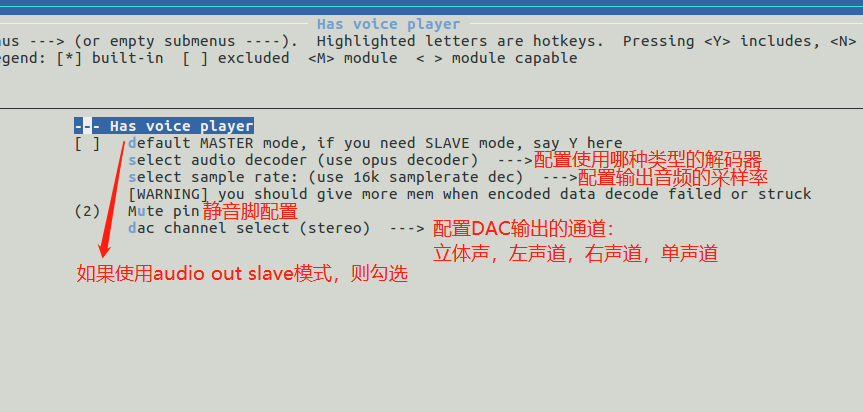
select audio decoder: DAC output audio decoder selection: opus, amr, adpcm
For the specific decoder source code, refer to
./lvp/common/player/decoder/
select sample rate: DAC output sample rate selection: 8k or 16k (determined by the compiled firmware size)
dac channel select: DAC output channel selection
1 2 3 4 5 6 | |
2.3.1 Opus Format Output Configuration Instructions*
Common Function Settings --->[*] Has voice player --->select audio decoder select use opus decoder
Common Function Settings --->[*] Has voice player --->select sample rate select use 8k samplerate dec or use 16k samplerate dec
For the opus format audio conversion tool, see Section 3.1
2.3.2 WAV Format Output Configuration Instructions*
Common Function Settings --->[*] Has voice player --->select audio decoder select use no decoder
For the wav format audio conversion tool, see Section 3.1
2.3.3 ADPCM Format Output Configuration Instructions*
Common Function Settings --->[*] Has voice player --->select audio decoder select use adpcm decoder
For the adpcm format audio conversion tool, see Section 3.2
2.4 MP3 Player Feature Configuration Instructions*
Common Function Settings -> Has mp3 player
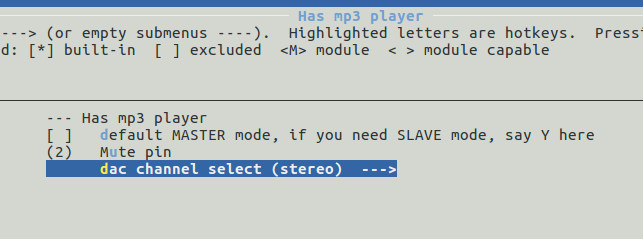
The configuration options are the same as the voice player, so they will not be described again.
Note
- The sample rate of mp3 audio files should use standard rates such as 8k, 16k, 48k
- The MCU frequency must be greater than 16M. Testing shows that below 16M, the sound may distort, likely due to insufficient processing speed
2.5 TTS Playback Application Code Instructions*
2.5.1 Voice Player Application Code Instructions*
LVP Application Settings -> Applications Selection: (Voice Player App)
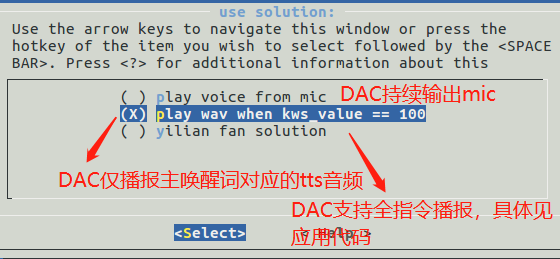
Focus on the directory ./app/voice_player/resource. This directory mainly stores hexadecimal array files converted from opus-encoded audio. Therefore, audio files need to be encoded with opus. See the next section for the encoding tool.
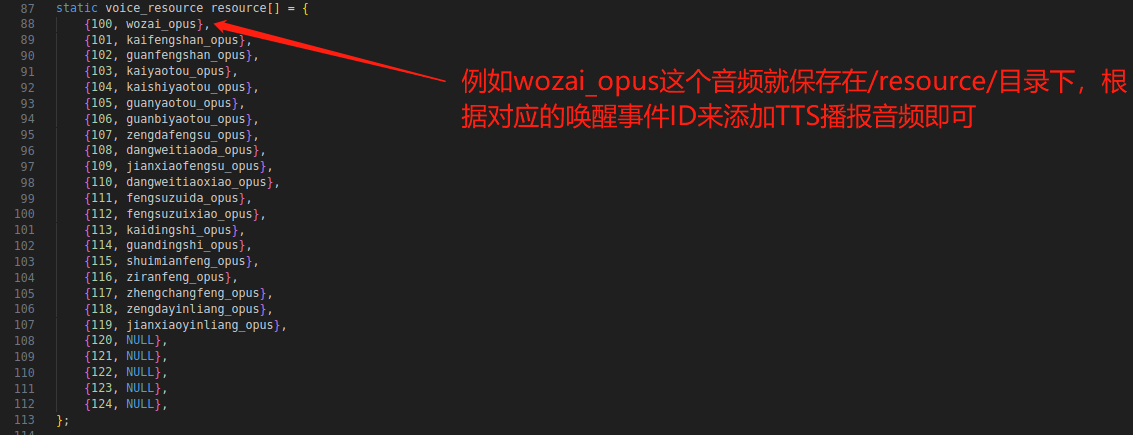
Modify the lvp_app_voice_player.c file and call the LvpVoicePlayerPlay(); API to play audio according to your requirements.
Note
- If adpcm format output is selected, the output interface needs to be changed to LvpVoicePlayerPlayAdpcm();
- The MCU frequency must be greater than 16M. Testing shows that below 16M, the sound may distort, likely due to insufficient processing speed
2.5.2 MP3 Player Application Code Instructions*
LVP Application Settings -> Applications Selection: (mp3 Player App)
Similar to the voice player application, except that the initialization and playback interfaces differ.
LvpMp3PlayerInit();
LvpMp3PlayerPlay();
3. TTS Playback Audio File Conversion Tool Instructions*
3.1 codec_demo Tool*
3.1.1 codec_demo Tool Repository Location*
./tools/audiocodec_tools/
The corresponding encoding tool source code (i.e., codec_demo.c) is located in the lvp_tws/tools/audiocodec_tools directory. Run make to generate the encoding tool (recommended to compile on Ubuntu 16.04).
3.1.2 codec_demo Tool Usage Instructions*
1 2 3 4 5 6 | |
Supports 16K or 8K mono wav format. Alternatively, compress the wav format to opus or amr format to reduce size.
Usage examples are as follows: (Linux system)
sudo ./codec_demo opus enc 16000 wozai.wav wozai.opus
xxd -i wozai.opus wozai.h
For mp3 or wav formats, simply use xxd -i to convert to hexadecimal.
xxd -i wozai.wav wozai.h
xxd -i wozai.mp3 wozai.h
3.2 adpcm Tool*
3.2.1 adpcm Tool Repository Location*
./tools/adpcm/
3.2.2 adpcm Tool Usage Instructions*
1 2 3 4 5 6 | |
Usage examples are as follows: (Linux system)
sudo ./adpcm -e -n256 wozai.wav wozai.adpcm -y
xxd -i wozai.adpcm wozai.h