NPU Compiler Usage*
Before using the NPU compiler gxnpuc, please carefully read the following two technical documents:
gxnpuc is used to convert network model files from open-source frameworks into offline model files compatible with the GX NPU processor;
1. gxnpuc Toolchain Functions and Corresponding Parameters*
1.1 General Function Parameters*
--help
-
Parameter Description:
Print the relevant parameter descriptions of the gxnpuc toolchain
-
Usage Example
$ gxnpuc --help

usage: gxnpuc [-h] [--cmpt] [--list] [-c {LEO,APUS,GRUS,V100,V120,V150}]
              [-f {TF,PT}] [-V] [-v] [-m] [-w] [-s] [-q]
              [config_filename]

NPU Compiler

positional arguments:
  config_filename       config file

optional arguments:
  -h, --help            show this help message and exit
  --cmpt                get version compatibility information between npu-
                        core, python, and frameworks
  --list                list supported ops
  -c {LEO,APUS,GRUS,V100,V120,V150}, --core_name {LEO,APUS,GRUS,V100,V120,V150}
                        subparameter of --list, specify NPU Core for listing
                        supported ops
  -f {TF,PT}, --framework {TF,PT}
                        subparameter of --list, specify Deep Learning
                        Framework for listing supported ops
  -V, --version         show program's version number and exit
  -v, --verbose         verbosely list the processed ops
  -m, --meminfo         verbosely list memory info of ops
  -w, --weights         print compressed weights (GRUS only)
  -s, --save_hist       save histograms of weights value to 'npu_jpgs'
                        directory (GRUS only)
  -q, --quant           inference and generate quant file
--version
-
Parameter Description:
Display the current compiler version information
-
Usage Example
gxnpuc --version
--list
-
Parameter Description:
List the operator information supported by the current NPU compiler
-
Associated Sub-parameters
Sub-parameters are only valid when used with the --list parameter and are not mandatory
-c
Specify the chip version, parameter value range: {LEO,APUS,GRUS,V100,V120,V150}-f
Specify the front-end deep learning framework, parameter value range: {TF, PT} -
Usage Examples:
List all operator information supported by the current NPU compiler
gxnpuc --listList all operator information supported by the current NPU APUS compiler
gxnpuc --list -c APUSList all PyTorch operator information supported by the current NPU APUS compiler
gxnpuc --list -c APUS -f PT
--cmpt
-
Parameter Description:
Print the Python, chip model, and front-end DL framework version information supported by the compiler, as well as the compatibility relationships between them
-
Usage Example:
gxnpuc --cmpt
1.2 Model Compilation and Conversion Parameters*
config_filename
-
Parameter Description:
Specify the path and filename of the compilation configuration file. This configuration file is read during model conversion and model tuning.
-
Associated Sub-parameters (only valid when config_filename is correctly configured)
-v
Function Description: When compiling the model, print the NPU model structure information-m
Function Description: When compiling the model, print the memory status used by each operator node in the NPU model -
Usage Example:
The NPU APUS compiler uses config.yaml as the conversion configuration file for the original model, with all sub-parameter functions enabled
gxnpuc config.yaml -v -m -w -s
Notes on gxnpuc Function Parameter Usage
The above four parameter groups --version/-V, --list, --cmpt, and config_filename are mutually exclusive and cannot be used simultaneously
2. Model Compilation and Conversion Configuration File Description*
2.1 TensorFlow Configuration Items*
| Configuration Item | Parameter Value | Parameter Description |
|---|---|---|
| CORENAME | APUS | Chip model |
| FRAMEWORK | TF | Specify the front-end DL framework type of the model to be converted |
| MODEL_FILE | Model filename and path e.g., ./model.pb | Specify the filename and path of the model to be converted |
| IN_FEATS_FILE | Model input features and path e.g., ./feats.txt | Used to calculate the quantization parameter values of all nodes during quantization inference |
| QUANT_FILE | Quantization filename e.g., quant.yaml | Specify the name of the quantization file generated during the compiler's quantization inference process |
| OUTPUT_TYPE | c_code | Specify the format of the NPU file output by the compiler |
| OUTPUT_FILE | NPU filename e.g., npu.h | Specify the name of the NPU file output by the compiler |
| INPUT_OPS | op_name: shape | Specify the relevant information of all input nodes of the NPU model |
| OUTPUT_OPS | [output_name, ...] | Specify the relevant information of all output nodes of the NPU model |
| COMPRESS | true / false (default false) | Whether to enable fully connected weight quantization compression |
| MAX_CACHE_SIZE | Specific memory value e.g., 10240 | Allocate CACHE memory in SRAM for storing weights and data |
| USE_DATA_CACHE | true / false (default false) | Whether data needs to be stored in cache; can be set to true when data is stored in PSRAM |
| FUSE_BN | true / false (default false) | Whether to enable BN parameter fusion |
| SPLIT_CMD | true / false (default true) | Whether to split instructions based on convolution execution time (split one instruction to within 1ms) |
Notes
- The original model to be converted must be in FrozenPB format
- The APUS compiler does not support BN operations. If the original model to be converted contains BN operations, the BN must be fused into the weight information during compilation
-
File Format
Each line represents a set of input features. The data arrangement and data length of each line must be consistent with the dimensions of the input features, with feature values separated by commas; additionally, data between lines is also separated by commas. The provided feature data should cover various application scenarios as much as possible.
-
Usage Example
The model is applied in quiet, home conversation, and white noise environments. The user needs to randomly select a wav from each environment, concatenate these wavs into one, and extract its feature file. For example, the Feats configured in the config.yaml file is [1, 1, 10], so the feature file format is as follows:
feats.txt0.3826,0.3445,0.2839,0.4637,0.3573,0.7226,0.8244,0.135,0.202,0.9004, 0.402,0.50962,0.6991,0.4234,0.28219,0.1980,0.31208,0.687,0.0483,0.5683, ... 0.3176,0.35404,0.9429,0.919,0.14952,0.9451,0.6569,0.227,0.19459,0.023, 0.43631,0.2177,0.663,0.3806,0.393,0.38857,0.7234,0.60385,0.0879,0.0696,
-
Parameter Format
op_name: shape
op_name —— Name of the model input node shape —— The shape of the input corresponding to the node named op_name during inference -
Usage Example
When building a model in the TensorFlow framework, placeholders are typically defined as inputs to the computation graph. Users need to specify specific identifiers as input names for the placeholders.
In this example code, the model defines four groups of placeholders (model inputs), with Feats, State_c0, State_c1, and State_c2 configured as input names respectively.
Among them, state0_in, state1_in, and state2_in are the state values output from the previous frame (all-zero tensors for the initial frame).
inputs    = tf.placeholder(tf.float32, [1, 1, 64], name="Feats")
state0_in = tf.placeholder(tf.float32, [1, 3, 64], name="State_c0")
state1_in = tf.placeholder(tf.float32, [1, 4, 64], name="State_c1")
state2_in = tf.placeholder(tf.float32, [1, 5, 64], name="State_c2")
Therefore, the INPUT_OPS parameter in the model configuration file can be configured as follows:
config.yamlINPUT_OPS: Feats: [1, 1, 64] State_c0: [1, 3, 64] State_c1: [1, 4, 64] State_c2: [1, 5, 64]Notes
- Input state nodes must be placed after the input features
-
Parameter Format
[output_name, ...]
output_name is the name of the model output node -
When building a model in the TensorFlow framework, to facilitate NPU compilation configuration, users can use the tf.identity interface to copy and rename output tensors.
In this example code, four groups of output tensors are configured with Result, State_c0_out, State_c1_out, and State_c2_out identifiers as output names.
Among them, state0_out, state1_out, and state2_out are the state values output for the current frame.
outputs, states = fsmn_layer(...)

result_out = tf.identity(outputs,   name="Result")
state1_out = tf.identity(states[0], name="State_c0_out")
state2_out = tf.identity(states[1], name="State_c1_out")
state3_out = tf.identity(states[2], name="State_c2_out")
Therefore, the OUTPUT_OPS parameter in the model configuration file can be configured as follows:
config.yamlOUTPUT_OPS: [State_c0_out, State_c1_out, State_c2_out, Result]Notes
- Output state nodes must be placed before the prediction output node
-
Parameter Format
USE_DATA_CACHE: false/true
-
Usage Environment
If data is stored in PSRAM, to reduce the overhead of repeatedly reading data, USE_DATA_CACHE can be set to true when compiling the model. Data will be copied from PSRAM to SRAM, thereby improving the efficiency of repeated data reads.
Notes
- When this configuration item is set to true, MAX_CACHE_SIZE must be configured to be greater than 0
2.2 PyTorch Configuration Items*
Notes
If the user needs to compile and convert a PyTorch model, the NPU compiler version must be at least 1.6.0b0, and Python3.7 must be used
| Configuration Item | Parameter Value | Parameter Description |
|---|---|---|
| CORENAME | APUS | Chip model |
| FRAMEWORK | PT | Specify the front-end DL framework type of the model to be converted |
| MODEL_FILE | Model filename and path e.g., ./model.pth | Specify the filename and path of the model to be converted |
| IN_FEATS_FILE | Model input features and path e.g., ./feats.txt | Used to calculate the quantization parameter values of all nodes during quantization inference |
| QUANT_FILE | Quantization filename e.g., quant.yaml | Specify the name of the quantization file generated during the compiler's quantization inference process |
| OUTPUT_TYPE | c_code | Specify the format of the NPU file output by the compiler |
| OUTPUT_FILE | NPU filename e.g., npu.h | Specify the name of the NPU file output by the compiler |
| INPUT_OPS | input_index: shape | Specify the relevant information of all input nodes of the NPU model |
| INPUT_NCX_TO_NXC | [input_index, ...] | Whether to convert the data layout format of the NPU model input tensors |
| COMPRESS | true / false (default false) | Whether to enable fully connected weight quantization compression |
| MAX_CACHE_SIZE | Specific memory value e.g., 10240 | Allocate CACHE memory in SRAM for storing weights and data |
| USE_DATA_CACHE | true / false (default false) | Whether data needs to be stored in cache; can be set to true when data is stored in PSRAM |
| FUSE_BN | true / false (default false) | Whether to enable BN parameter fusion |
| SPLIT_CMD | true / false (default true) | Whether to split instructions based on convolution execution time (split one instruction to within 1ms) |
Notes
-
The original model to be converted must be in jit.ScriptModule format
-
Compiler version above 1.6.0.b0, Python3.7, PyTorch 1.10 - 1.13
-
Parameter Format
input_index: shape
input_index —— Index of the input node shape —— The inference shape of the corresponding input in the NPU model -
Since the PyTorch framework uses dynamic computation graphs, the names of operator nodes are automatically generated, making it impossible to configure identifiers for inputs;
Therefore, when the NPU compiler converts a PyTorch model, the INPUT_OPS parameter in the configuration file uses index values to map input tensors;
In this example, a custom PyTorch model is built by inheriting the nn.Module base class, and the configuration method of the INPUT_OPS parameter is briefly described:
From the forward method, it can be seen that the above model defines two groups of inputs, x and y. The index of input x is 0, and the index of input y is 1;class Net(nn.Module): def __init__(self): super(Net, self).__init__() self.conv1 = nn.Conv2d(in_channels=3, out_channels=32, kernel_size=3) self.pool1 = nn.MaxPool2d(kernel_size=2, stride=2) self.conv2 = nn.Conv2d(in_channels=1, out_channels=32, kernel_size=3) self.pool2 = nn.MaxPool2d(kernel_size=2, stride=2) self.adaptive_pool = nn.AdaptiveMaxPool2d((1,1)) self.flatten = nn.Flatten() self.linear1 = nn.Linear(64,32) self.relu = nn.ReLU() self.linear2 = nn.Linear(32,1) def forward(self, x, y): x = self.conv1(x) x = self.pool1(x) y = self.conv2(y) y = self.pool2(y) z = torch.concat([x,y], dim=1) z = self.adaptive_pool(z) z = self.flatten(z) z = self.linear1(z) z = self.relu(z) y = self.linear2(z) return y net = Net() input0_tensor = torch.randn([1, 3, 32, 32]) input1_tensor = torch.randn([1, 1, 32, 32]) output_tensor = net(input0_tensor, input1_tensor)Therefore, the INPUT_OPS parameter in the model configuration file can be configured as follows:
config.yamlINPUT_OPS: 0: [1, 3, 32, 32] 1: [1, 1, 32, 32] -
Constraints
When converting a PyTorch model, the inputs must be tensors. Tensor lists or tensor tuples are not allowed.
The NPU compiler does not support the above input formats. Users need to split tensor lists and tensor tuples into individual tensors for input.
In this example model, the input uses a tensor list/tensor tuple (the model differs from the one in the Usage Example only in the inputs).
class Net(nn.Module):
    def __init__(self):
        super(Net, self).__init__()
        self.conv1 = nn.Conv2d(in_channels=3, out_channels=32, kernel_size=3)
        self.pool1 = nn.MaxPool2d(kernel_size=2, stride=2)
        self.conv2 = nn.Conv2d(in_channels=1, out_channels=32, kernel_size=3)
        self.pool2 = nn.MaxPool2d(kernel_size=2, stride=2)
        self.adaptive_pool = nn.AdaptiveMaxPool2d((1,1))
        self.flatten = nn.Flatten()
        self.linear1 = nn.Linear(64,32)
        self.relu    = nn.ReLU()
        self.linear2 = nn.Linear(32,1)

    def forward(self, xy):
        x = self.conv1(xy[0])
        x = self.pool1(x)
        y = self.conv2(xy[1])
        y = self.pool2(y)
        z = torch.concat([x,y], dim=1)
        z = self.adaptive_pool(z)
        z = self.flatten(z)
        z = self.linear1(z)
        z = self.relu(z)
        y = self.linear2(z)
        return y

net           = Net()
input0_tensor = torch.randn([1, 3, 32, 32])
input1_tensor = torch.randn([1, 1, 32, 32])
list_tensor   = [input0_tensor, input1_tensor]
tuple_tensor  = (input0_tensor, input1_tensor)

# Input is a tensor list
output_tensor = net(list_tensor)

# Input is a tensor tuple
output_tensor = net(tuple_tensor)
-
Parameter Overview
In the deep learning field, multi-dimensional tensors are typically used for data transmission between model operator nodes. For example, feature maps in convolutional neural networks are usually stored as four-dimensional tensors.
The dimensions of a four-dimensional tensor can be represented as N: batch; H: height; W: width; C: channels.
Since data is stored linearly in memory, when the access order of data dimensions changes, the distribution of data in memory also differs; The PyTorch framework uses the NCHW order, while the TensorFlow framework uses the NHWC order. The above two access orders can be referred to as data formats.
The NPU stores compute-intensive operator data in NHWC and NLC data formats. If the input tensor of an NPU compute-intensive operator is in NCHW or NCL data format, the compiler will insert a transpose node before the operator to perform the data format conversion.
-
Parameter Description
When the data format of the original model input tensor is NCHW or NCL, this parameter can be configured to determine whether, during NPU model inference, the input tensor maintains the data layout format from the original PyTorch model, or whether it requires the data layout format after NCHW -> NHWC or NCL -> NLC conversion.
-
Parameter Format
[input_index, ...]
input_index —— Index of the input node that requires data layout format conversionNotes
When enabling data layout format conversion for a specific input tensor, the shape of the corresponding input in the INPUT_OPS parameter must be adjusted accordingly. See the usage example for details.
-
Usage Example
import torch.nn as nn

class Model(torch.nn.Module):
    def __init__(self):
        super(Model, self).__init__()
        self.gru  = torch.nn.GRU(128, 128, batch_first=True, bias=True)
        self.conv = torch.nn.Conv1d(128, 128, 1, 1)

    def forward(self, x, h):
        x = self.conv(x)
        x = x.permute(0, 2, 1)
        z = self.gru(x, h)

        return z

model        = Model()
batch        = 1
seq_length   = 32
channel      = 128
input_tensor = torch.randn([batch, channel, seq_length])
input_state  = torch.randn([1, batch, channel])

output_tensor, output_state = model(input_tensor, input_state)
When the above model performs inference in the PyTorch framework, the data layout format of input_state is not NCL, so data layout format conversion cannot be performed;
The data layout format of input_tensor is NCL, so the user can choose whether to perform data layout format conversion before providing it to the NPU model input;
The following describes the two cases of enabling and disabling the format conversion parameter:
-
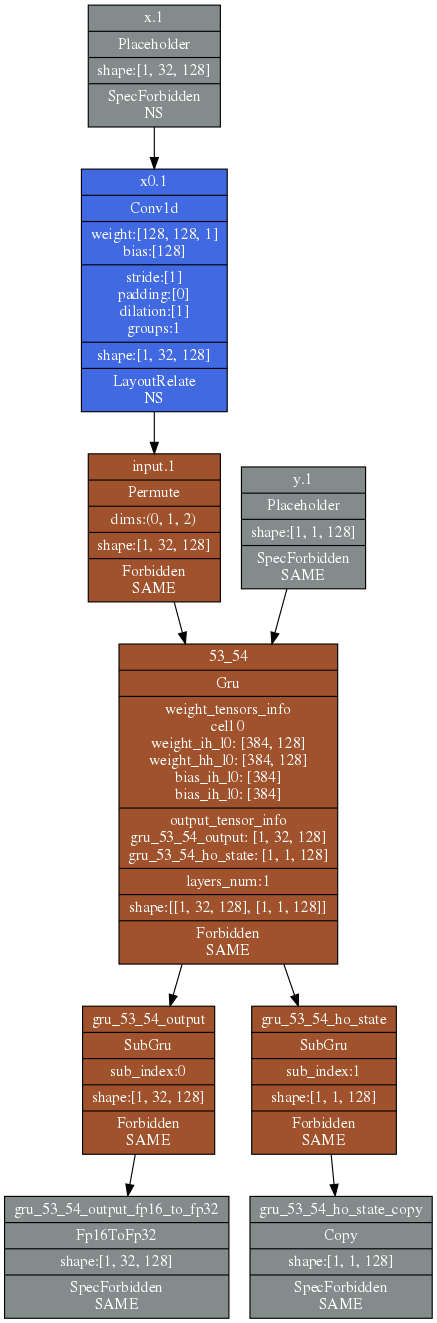
Parameter enabled, input tensor input_tensor undergoes format conversion
The original model input shape of input_tensor is [1, 128, 32]. After enabling the format conversion function, the actual shape required by the NPU model is [1, 32, 128].
The INPUT_NCX_TO_NXC and INPUT_OPS parameters in the model configuration file can be configured as follows:
config.yamlINPUT_NCX_TO_NXC: [0] INPUT_OPS: 0: [1, 32, 128] 1: [1, 1, 128]The following figure shows the model structure:
-
Parameter disabled, input tensor input_tensor maintains the original data layout format
The INPUT_NCX_TO_NXC and INPUT_OPS parameters in the model configuration file can be configured as follows:
config.yamlINPUT_NCX_TO_NXC: [] INPUT_OPS: 0: [1, 128, 32] 1: [1, 1, 128]The following figure shows the model structure:
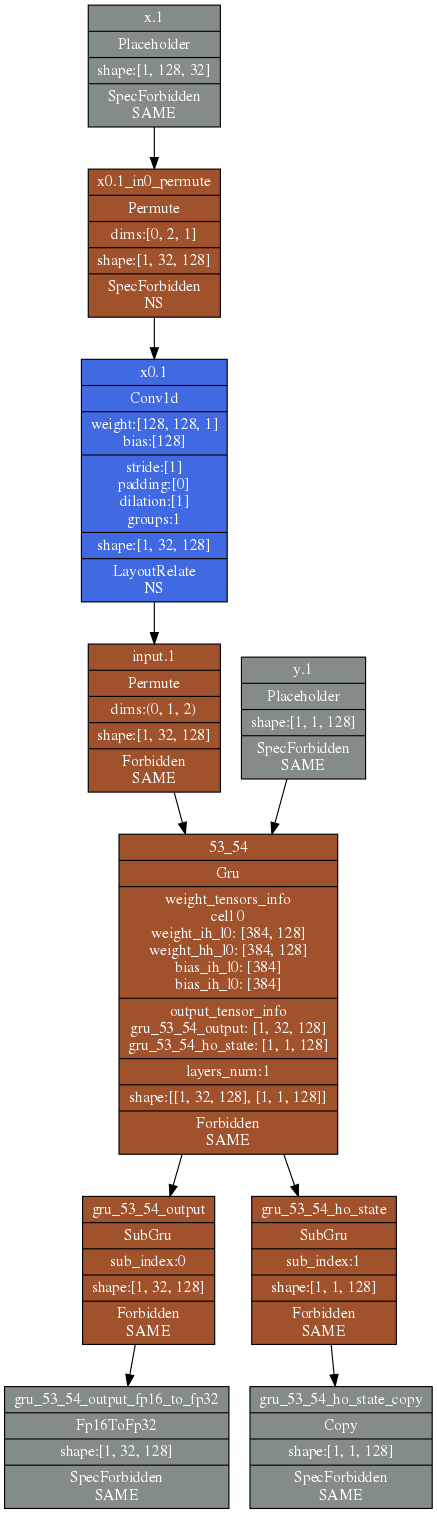
Comparing the above two NPU model structure diagrams, it can be seen that after enabling the format conversion function, the transpose nodes inserted on the input side can be optimized.
This parameter allows for more flexible configuration of the input tensor data format according to user requirements.
-
3. Compiling the Model*
3.1 Model File Preparation*
The NPU compiler strictly restricts the model file format. Different frameworks must export the model in the specified manner.
TensorFlow
- Prepare the CKPT and PB files generated by TensorFlow, or model files generated using the saved_model method.
- Generate the FROZEN_PB file using the
freeze_graph.pyscript provided by TensorFlow.
PyTorch
- After model training is complete, export the model weight file.
- Build the PyTorch inference model script and generate a PyTorch Module instance.
-
Convert the custom PyTorch Module to a Torch ScriptModule, and serialize the ScriptModule instance to output the model file required by the compiler.
For the above steps, please refer to PyTorch Model Conversion Example
3.2 Writing the Configuration File*
- Write a yaml configuration file, including the model filename, input feature filename, output filename, output file type, quantization filename, whether to compress, input node names and dimension information, output node names, etc.
3.3 Compiling to Generate the Model File*
Generating the model file requires the following two steps:
- Perform model quantization inference to generate the model quantization file.
- Use the compiler to generate the model file.
The command to generate the model quantization file is as follows
$ gxnpuc config.yaml -q
$ gxnpuc config.yaml
Note
When the NPU toolchain compiles and processes model files from different deep learning frameworks, the corresponding framework runtime environment must be installed in the NPU toolchain. For the format description of the generated model file, please read: NPU Model Format Description