USB Development User Guide
USB Development Guide*
Chapter 1 Functional Features*
Key Features
- Supports Full-Speed mode
- Supports DMA
- Supports up to 16 endpoints, including endpoint 0
Chapter 2 Usage Examples*
2.1 Custom USB HID Transmit/Receive*
The following example demonstrates how the device can be recognized as both an HID mouse device and an HID vendor-specific device on a PC. Custom data communication with the PC can be performed through the HID vendor-specific device. Note that on Windows PCs, to enable communication between the HID vendor-specific device and the PC, standard devices such as an HID mouse or HID keyboard must be supported first. Therefore, an HID mouse device is also created in this example.
To use the USB functionality, the CPU main frequency must be set to 144M. Therefore, the app_system/app_system_clk.c file in the corresponding app directory needs to be modified.
On the PC, tools such as Bus Hound can be used for data transmit/receive testing.
#define SYS_CLK_CFG 3 //0:32M; 1:96M; 2:128M; 3:144M; 4:160M
#include <stdio.h>
#include <gx_hal_clk_apus.h>
#include <osal.h>
#include <gx_usbd.h>

static void _app_usb_hid_priv_send(const unsigned char *data, unsigned char len)
{
    usbd_hid_vendor_write((void *)data, len);
}

static void _app_usb_hid_vendor_cb(uint8_t *data, uint32_t size)
{
    printf("size = %d, data = 0x%02x\n", size, *data); // Received data
}

static void usb_send_data_test(void)
{
    printf("send usb data\n");

    // Custom data
    char data[16] = {0};
    data[0] = 0xFB;
    data[1] = 0x22;
    data[2] = 0x33;
    data[3] = 0x44;
    _app_usb_hid_priv_send(data, 16); // The data size to send is not limited. USB can only send a maximum of 64 bytes per transfer; if the data length exceeds 64 bytes, it will be automatically split into multiple transfers internally.
}

int main(void)
{
    printf("cpu freq =%d div =%d\n", gx_hal_clk_mod_get_freq(GX_HAL_CLK_MOD_CPU), gx_hal_clk_mod_get_div(GX_HAL_CLK_MOD_CPU));
    printf("xip freq =%d div =%d\n", gx_hal_clk_mod_get_freq(GX_HAL_CLK_MOD_XIP), gx_hal_clk_mod_get_div(GX_HAL_CLK_MOD_XIP));

    usbd_class_list_init();
    usbd_hid_mouse_class_register();
    usbd_hid_vendor_class_register(); // HID vendor-specific device
    usbd_hid_vendor_register_callback(_app_usb_hid_vendor_cb); // HID vendor-specific device receive data callback
    usbd_register();
    return 0;
}

COMMAND_EXPORT_ALIAS(usb_send_data_test, usb_send_data_test, "usb_send_data_test");
2.2 USB HID OTA*
Upgrading via USB HID OTA eliminates the need to press the boot button or reset the chip.
The default upgrade script uses USB VID and PID both set to 0x1919.
If you need to modify these, update config/sdk_config.h.
// USB
#define CONFIG_USB_VENDOR_ID    (0x1919)
#define CONFIG_USB_PRODUCT_ID    (0x1919)
The OTA upgrade tool is located in the apus\apps\ai_mouse\tools directory.
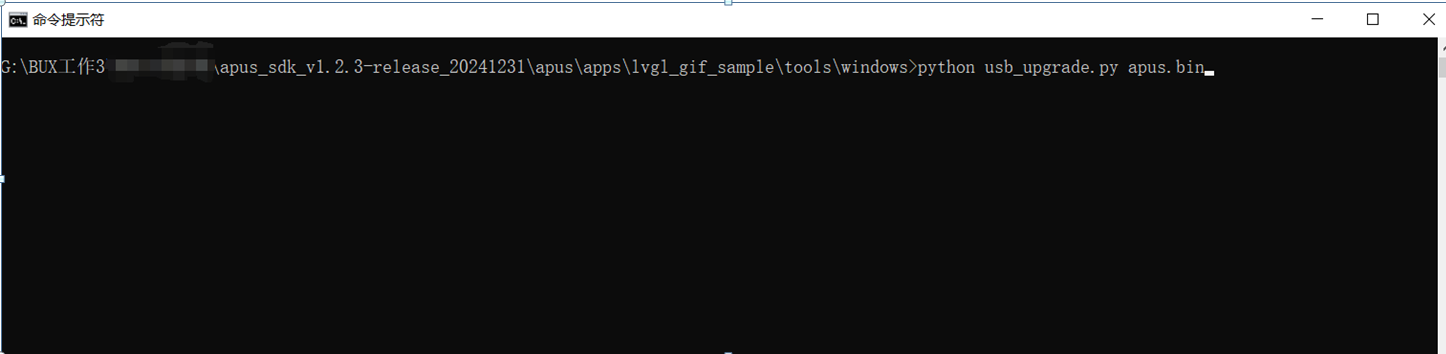
On Windows, open a cmd command line, navigate to the tools\windows directory, and manually create a tmp folder in that directory first.
Then trigger the OTA upgrade using the command: >python hid_windows_x64.exe apus.bin
#include <stdio.h>
#include <gx_hal_clk_apus.h>
#include <osal.h>
#include <gx_usbd.h>
#include <pm.h>

static void _app_usb_hid_priv_send(const unsigned char *data, unsigned char len)
{
    usbd_hid_vendor_write((void *)data, len);
}

static void _app_usb_hid_vendor_cb(uint8_t *data, uint32_t size)
{
    printf("size = %d, data = 0x%02x\n", size, *data);

    // USB HID OTA
    if (*data == 0xf0) //firmware upgrade
    {
        uint8_t v_cmd = 0x80;
        _app_usb_hid_priv_send(&v_cmd, 1);
        gx_mdelay(10);

        pm_enter_boot_mode(BOOT_MEDIUM_USB);
    }
}

static void usb_send_data_test(void)
{
    printf("send usb data\n");

    // Custom data
    char data[16] = {0};
    data[0] = 0xFB;
    data[1] = 0x22;
    data[2] = 0x33;
    data[3] = 0x44;
    _app_usb_hid_priv_send(data, 16); // The data size to send is not limited. USB can only send a maximum of 64 bytes per transfer; if the data length exceeds 64 bytes, it will be automatically split into multiple transfers internally.
}

int main(void)
{
    printf("cpu freq =%d div =%d\n", gx_hal_clk_mod_get_freq(GX_HAL_CLK_MOD_CPU), gx_hal_clk_mod_get_div(GX_HAL_CLK_MOD_CPU));
    printf("xip freq =%d div =%d\n", gx_hal_clk_mod_get_freq(GX_HAL_CLK_MOD_XIP), gx_hal_clk_mod_get_div(GX_HAL_CLK_MOD_XIP));

    usbd_class_list_init();
    usbd_hid_mouse_class_register();
    usbd_hid_vendor_class_register(); // HID vendor-specific device
    usbd_hid_vendor_register_callback(_app_usb_hid_vendor_cb); // HID vendor-specific device receive data callback
    usbd_register();
    return 0;
}

COMMAND_EXPORT_ALIAS(usb_send_data_test, usb_send_data_test, "usb_send_data_test");
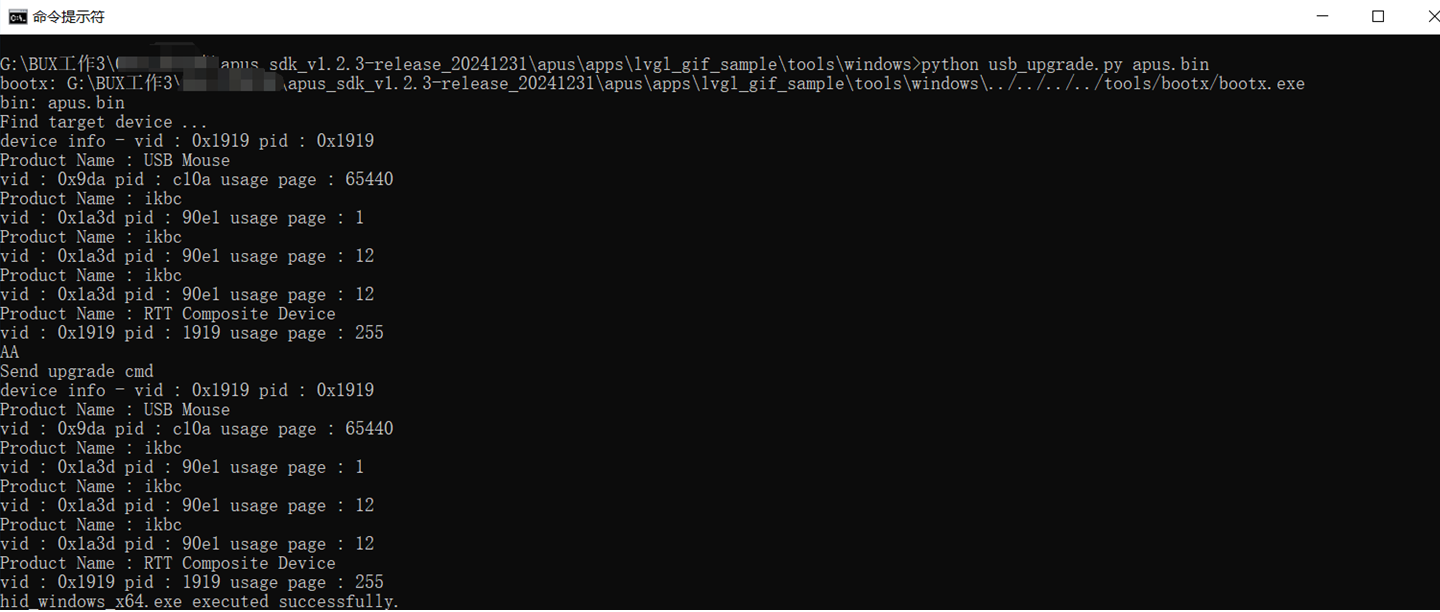
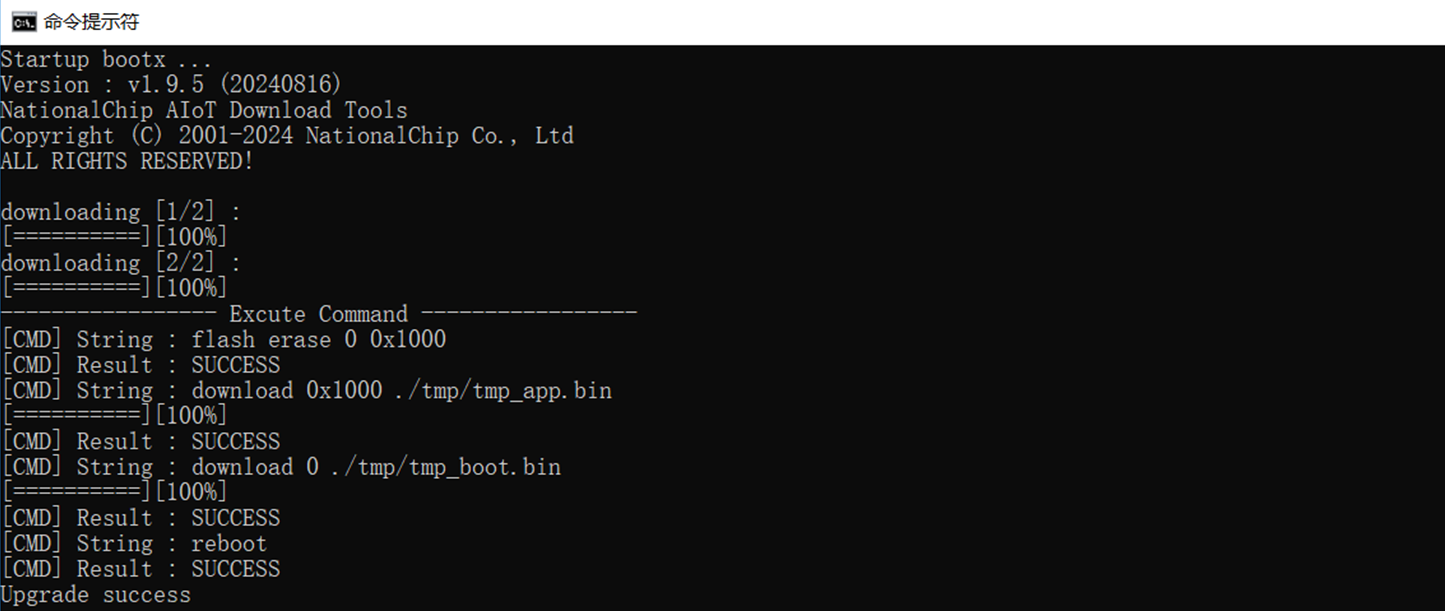
Upgrade success display
2.3 USB HID OTA Windows Tool*
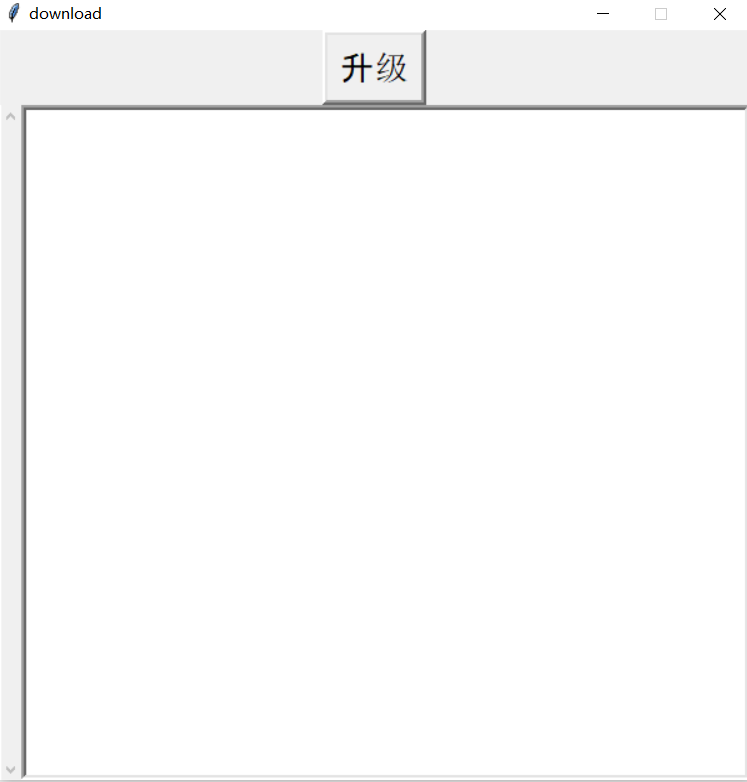
A Windows GUI tool is implemented here using Python to facilitate OTA upgrades without using the command line.
Customers can also modify this code for secondary development to meet their specific needs.
Build command: pyinstaller --onefile --hidden-import=usb --hidden-import=usb.backend.libusb1 --add-data "bootx.exe;bin" --add-data "apus.bin;bin" --add-data "hid_windows_x64.exe;bin" usb_upgrade.py
#!/usr/bin/env python3
# coding:utf-8

import usb.core
import usb.util
import usb.backend.libusb1
import subprocess
import asyncio
import argparse
import sys
import os
import time
import shutil
from pathlib import Path
from  tkinter import *

BOOT_VID = 0xa700
BOOT_PID = 0x0002

APP_VID = 0x1919
APP_PID = 0x1919

APP_VENDOR_INTERFACE_PROTOCOL = 0

def find_boot_usb_dev():
    #dev = usb.core.find(idVendor=BOOT_VID, idProduct=BOOT_PID)
    return None

def find_app_usb_dev():
    hid_executable_path = get_binary_path(os.path.join("bin", "hid_windows_x64.exe"))
    command = [hid_executable_path, "0x1919", "0x1919", "r"]

    try:
        # Execute the command and capture output
        process = subprocess.Popen(command, stdout=subprocess.PIPE, stderr=subprocess.PIPE, text=True)

        # Read output in real-time
        while True:
            output = process.stdout.readline()
            if output == '' and process.poll() is not None:
                break
            if output:
                print(output.strip())  # Print real-time output
                # Check if output contains "failed"
                if "failed" in output:
                    print("FF")
                    return False

        # If "failed" was not found
        print("AA")
        return True

    except Exception as e:
        print(f"Error executing command: {e}")

def get_app_usb_interface(dev, interface_protocol):
    cfg = dev.get_active_configuration()
    interface = None

    for intf in cfg:
        if intf.bInterfaceProtocol == interface_protocol:
            interface = intf

    return interface

def detach_app_usb_interface(dev, interface_number):
    if dev.is_kernel_driver_active(interface_number):
        try:
            dev.detach_kernel_driver(interface_number)
        except usb.core.USBError as e:
            raise RuntimeError("Could not detach kernel driver: %s" % str(e))


def write_out_ep(dev, endpoint, data):
    size = 0
    while(True):
        try:
            size = dev.write(endpoint.bEndpointAddress, data, 1000)  #write(endpoint, data, timeout = None)
        except Exception as e:
            print(e)
        break

    return size

def read_in_ep(dev, endpoint):
    data = None
    while(True):
        try:
            data = dev.read(endpoint.bEndpointAddress, endpoint.wMaxPacketSize, 3000)  #read(endpoint, size_or_buffer, timeout = None)
        except Exception as e:
            print(e)
        break

    return data

def split_bin(bin_path, target_dir):
    boot_bin_path = os.path.join(target_dir, "tmp_boot.bin")
    app_bin_path = os.path.join(target_dir, "tmp_app.bin")

    bin_size = os.path.getsize(bin_path)

    with open(bin_path, 'rb') as bin_file, open(boot_bin_path, 'wb') as boot_file, open(app_bin_path, 'wb') as app_file:
        bin_data = bin_file.read(0x1000)
        boot_file.write(bin_data)

        bin_file.seek(0x1000)
        bin_data = bin_file.read(bin_size - 0x1000)
        app_file.write(bin_data)

    return boot_bin_path, app_bin_path

def bootx_exec(boox_path, bin_path):
    boot_bin, app_bin = split_bin(bin_path, './')

    print("Startup bootx ...")
    bootx_cmd = 'flash erase 0 0x1000' + ';' + 'download 0x1000 ' + app_bin + ';' + 'download 0 ' + boot_bin + ';' +'reboot'
    ret = subprocess.check_call([boox_path, "-m", "auto", "-t", "u", "-c", bootx_cmd])

    os.remove(boot_bin)
    os.remove(app_bin)

    return ret

def fun_refresh_text(text, str_text):
    text['state'] = "normal"
    text.insert('end', str_text)
    text.insert('end', "\n")
    text.see(END)
    text['state'] = "disabled"

def fun_clear_text(text):
    text['state'] = "normal"
    text.delete(0.0, END)
    text['state'] = "disabled"

def bootx_exec_new(boox_path, bin_path):
    boot_bin, app_bin = split_bin(bin_path, './')

    print("Startup bootx ...")
    bootx_cmd = 'flash erase 0 0x1000' + ';' + 'download 0x1000 ' + app_bin + ';' + 'download 0 ' + boot_bin + ';' +'reboot'


    # Start the process
    process = subprocess.Popen(
    [boox_path, "-m", "auto", "-t", "u", "-c", bootx_cmd],
    stdout=subprocess.PIPE,  # Redirect standard output
    text=True               # Handle output as text
    )

    # Get output in real-time (line by line)
    while True:
        output = process.stdout.readline()
        if output == '' and process.poll() is not None:
            break
        if output:
            print(output.strip())
            fun_refresh_text(text_log, output.strip())

    # Get remaining output and errors
    stdout, stderr = process.communicate()

    #print("Return code:", process.returncode)
    #fun_refresh_text(text_log, process.returncode)

    #ret = subprocess.check_call([boox_path, "-m", "auto", "-t", "u", "-c", bootx_cmd])

    os.remove(boot_bin)
    os.remove(app_bin)

    return process.returncode

def upgrade_main(bootx_path, bin_path):
    if os.path.isfile(bootx_path) is False:
        raise ValueError("bootx is not found")
        return

    if os.path.isfile(bin_path) is False:
        raise ValueError("bin is not found")
        return

    print("Find target device ...")

    ret = find_app_usb_dev()
    if ret is False:
        dev = find_boot_usb_dev()
        if dev is None:
            print("Recovery...")
            ret = bootx_exec_new(bootx_path, bin_path)
            if ret == 0:
                print("Upgrade success")
        else:
            raise ValueError("Device not found")
        return

    print("Send upgrade cmd")

    #hid_executable_path = os.path.join(py_path, "./hid_windows_x64.exe")
    hid_executable_path = get_binary_path(os.path.join("bin", "hid_windows_x64.exe"))

    try:
        subprocess.check_call([hid_executable_path, "0x1919", "0x1919", "write", "0xf0"])
        print("hid_windows_x64.exe executed successfully.")
    except subprocess.CalledProcessError as e:
        print("Error executing hid_windows_x64.exe: %s" % str(e))
        exit(1)

    time.sleep(1)

    ret = bootx_exec_new(bootx_path, bin_path)
    if ret == 0:
        print("Upgrade success")

    return

def fun_button_exit_command():
    external_exe_path = get_binary_path(os.path.join("bin", "bootx.exe"))
    external_bin_path = get_binary_path(os.path.join("bin", "apus.bin"))

    try:
        upgrade_main(external_exe_path, external_bin_path)
    except Exception as e:
        print(f"Error executing command: {e}")

def get_binary_path(relative_path):
    """Get the path of the packaged binary file"""
    try:
        # Temporary folder path created by PyInstaller
        base_path = sys._MEIPASS
    except AttributeError:
        # Not in a packaged environment, use the current directory
        base_path = os.path.dirname(os.path.abspath(__file__))

    return os.path.join(base_path, relative_path)

if __name__ == '__main__':
    py_path = os.path.dirname(os.path.realpath(__file__))

    #external_exe_path = get_binary_path(os.path.join("bin", "bootx.exe"))
    #external_bin_path = get_binary_path(os.path.join("bin", "apus.bin"))

    #upgrade_main(external_exe_path, external_bin_path)

    if getattr(sys, 'frozen', False):
        ctypes.windll.user32.ShowWindow(ctypes.windll.kernel32.GetConsoleWindow(), 0)

    root = Tk()
    root.title("download")

    root.geometry("600x600")

    # Disable window resizing (both width and height are non-resizable)
    root.resizable(False, False)

    frame_5 = Frame(root)
    button_exit = Button(frame_5, text="Upgrade", font=("Arial", 20), bd = 4, fg = "black", command=fun_button_exit_command)
    button_exit.pack(side=BOTTOM, fill=BOTH, expand=1)
    frame_5.pack()

    frame_3 = Frame(root)
    scrollbar_log = Scrollbar(root)
    text_log = Text(frame_3, font=("Arial", 10), bd=4, height=10, width=30, state=DISABLED)
    scrollbar_log.config(command=text_log.yview)
    text_log.config(yscrollcommand=scrollbar_log.set)
    text_log.pack(side=LEFT, fill=BOTH, expand=1)
    scrollbar_log.pack(side=LEFT, fill=Y)
    frame_3.pack(fill=BOTH, expand=1)

    root.mainloop()
Reference code download link (http://yun.nationalchip.com:10000/l/LFOtYh)
Interface screenshot: