LVGL Image Display Development Guide*
Chapter 1 Overview*
NationalChip has implemented its own patented QGIF animation technology for GIF format images, allowing the GX8302 to significantly reduce Flash usage and improve animation frame rates. Typical animation compression ratios can reach over 10x, with frame rates >30fps. NationalChip has also implemented its own patented compression technology for PNG format images, enabling fast decoding, display, and reduced Flash usage.
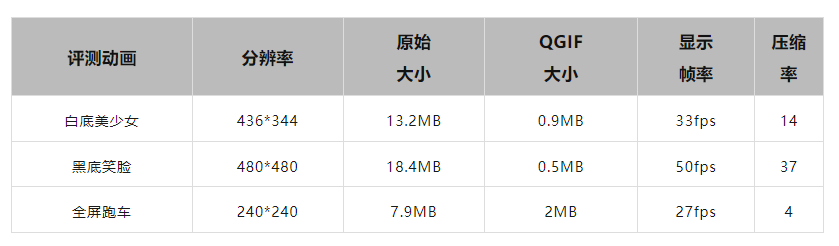
Note
The original image width and height need to be 4-pixel aligned, for example 40*40, 360*120
Chapter 2 Image Conversion Tools*
2.1 Local Tools*
2.1.1 Linux Version Online Installation*
On a Linux PC, enter: pip install qgif
Note: Python version >=3.8 is required
2.1.2 Linux Offline Version Download*
Download address: http://yun.nationalchip.com:10000/l/pFDZMG
2.1.3 Windows Offline Version Download*
Download address: http://yun.nationalchip.com:10000/l/iFiKgP
2.2 Online Tool*
Online tool: http://imageconverter.nationalchip.com:55002/
Chapter 3 Image Conversion and Display Development*
2.3 GIF Image Conversion*
Assume we have a GIF image named: hello.gif, with dimensions 360x360
If the Linux local tool is installed, use the command:
qgif convert -i hello.gif -o output.qgif -f gx96 -l
Or
qgif convert -i hello.gif -o output.qgif -f gx64 -l
gx64 compression speed is much faster than gx96
An output.c file will be generated in the directory. This file is in LVGL image C format and can be used directly by LVGL
In output.c, the following structure is already defined:
const lv_img_dsc_t output = {
  .header.cf = LV_IMG_CF_RAW_CHROMA_KEYED,
  .header.always_zero = 0,
  .header.reserved = 0,
  .header.w = 360,
  .header.h = 360,
  .data_size = 691537,
  .data = output_bin,
};
The --scale-size parameter can be used for scaling:
qgif convert -i hello.gif -o output.qgif -f gx96 --scale-size 240 240 -l
However, to ensure the best image quality, it is recommended that the artwork be prepared directly without using the scaling feature
Or use the online conversion tool:
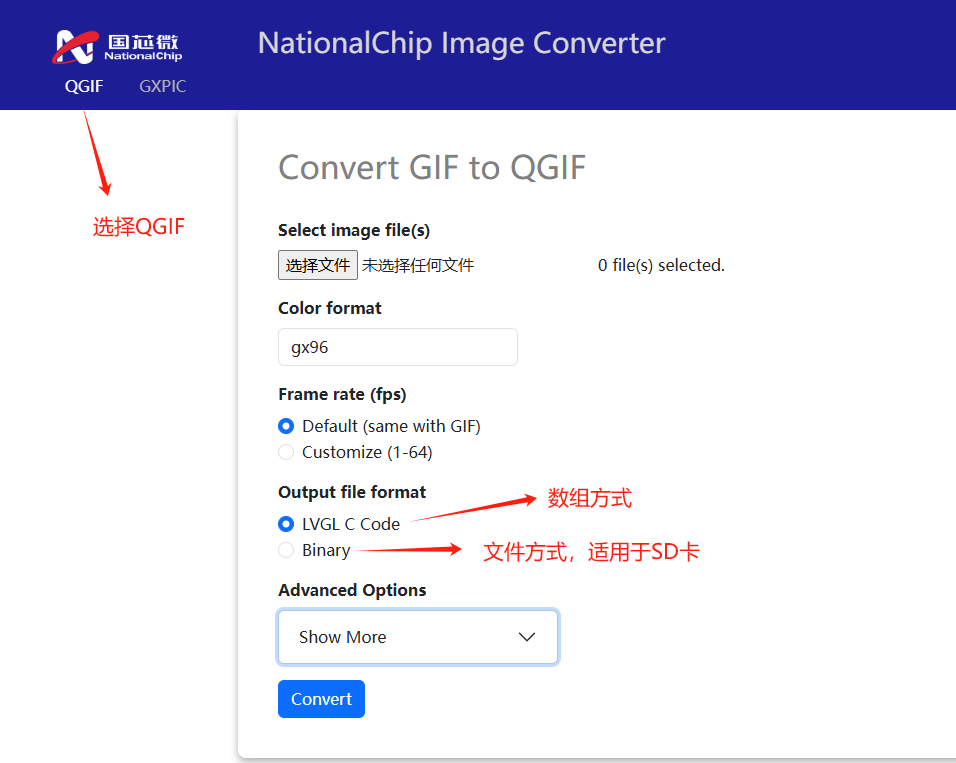
gx96 image quality is better than gx64, but the image size will also be larger. Users can choose according to their needs.
2.4 PNG Image Conversion*
Use the online conversion tool:
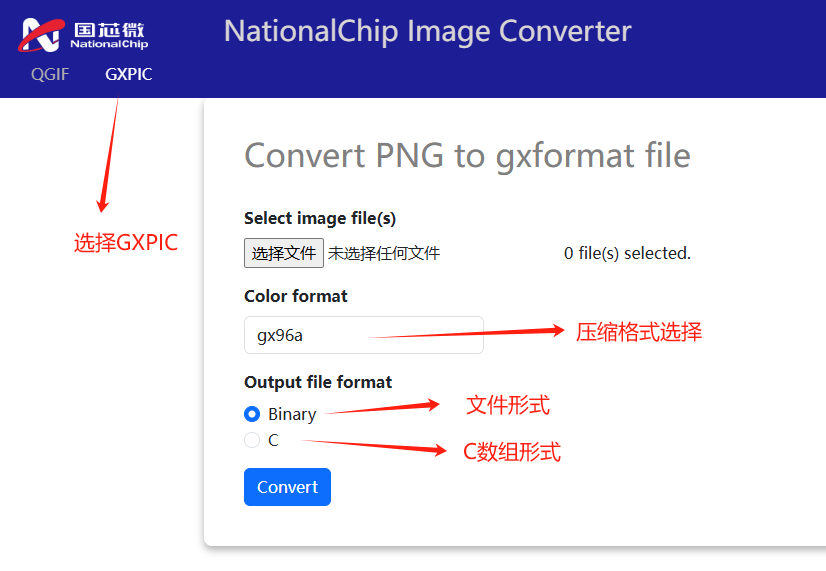
gx96 does not include an Alpha channel, gx96a includes an Alpha channel gx96 image quality is better than gx64, but the image size will also be larger
Chapter 3 Example Demonstration*
3.1 Image Resource as C Array*
Refer to the apps\lvgl_gif_sample example in the SDK
To support QGIF, the following macro needs to be enabled in app_lv_conf.h:
#define LV_USE_GX_GA_LITE 1
After the program runs, you can enter the following commands in the command line:
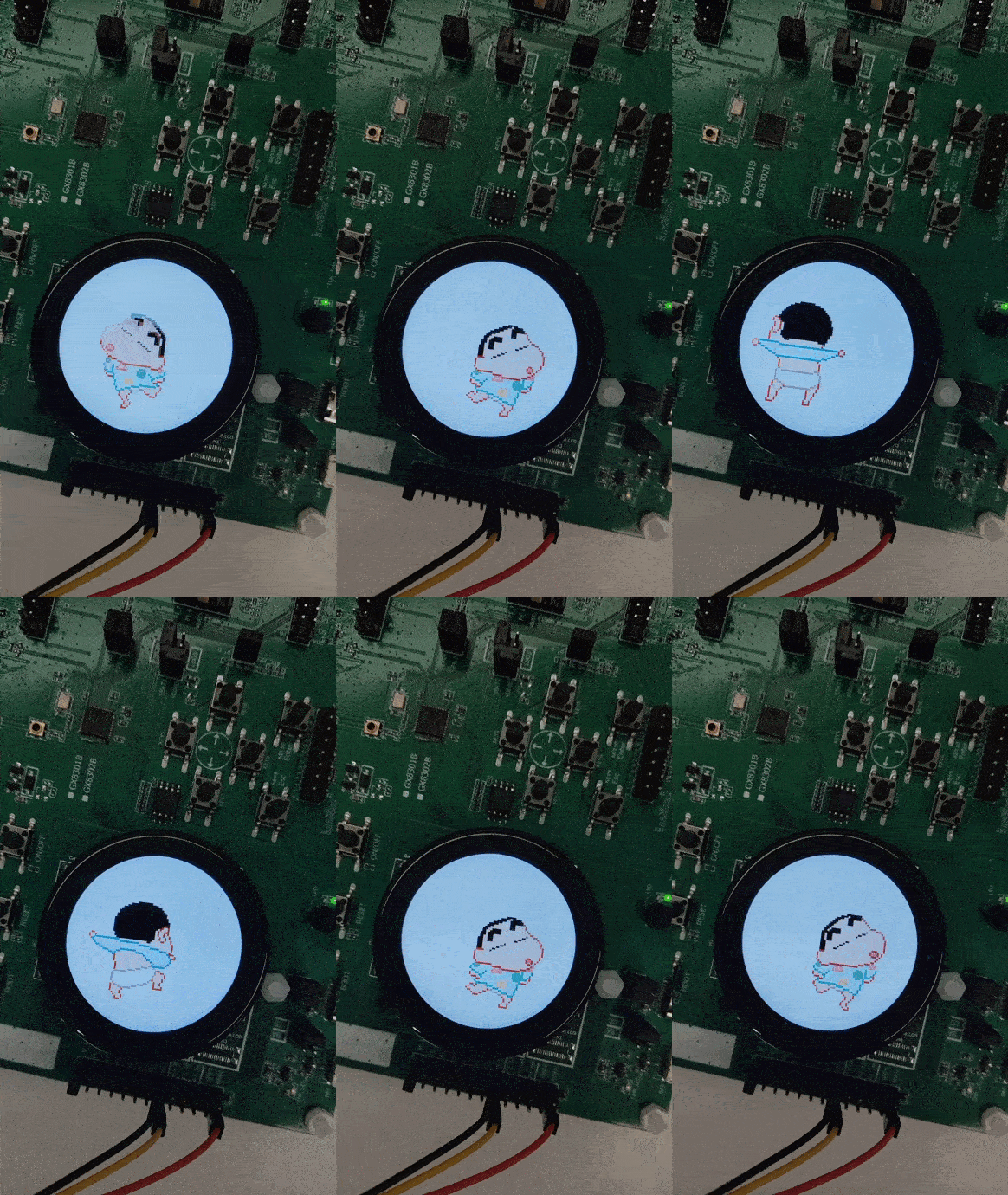
qgif_img_test or png_img_test to view the display effects of both image types
QGIF effect example:
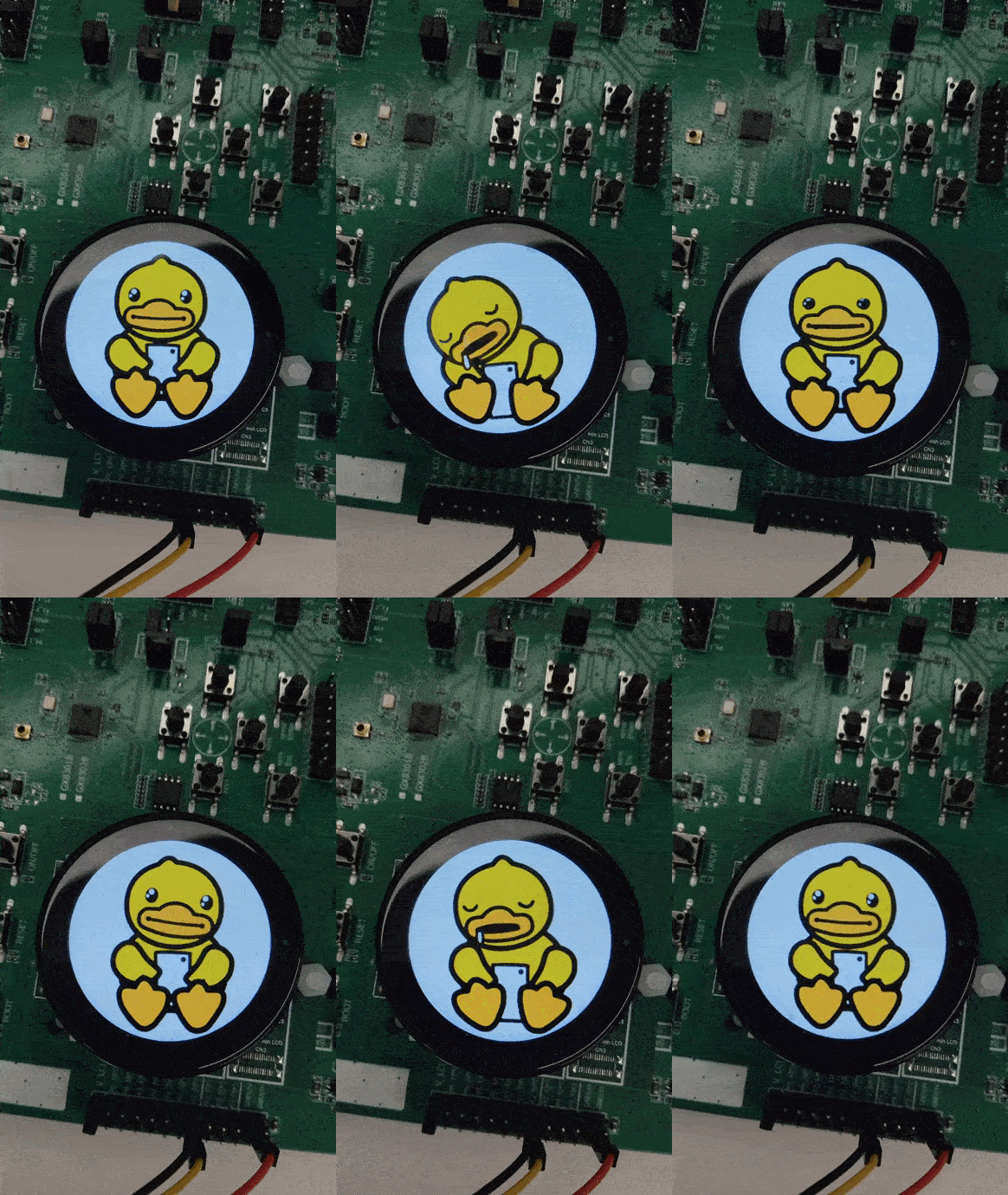
3.2 Image Resource as File*
Define in app_lv_conf.h:
#define LV_USE_QGIF         1
#define LV_USE_FS_FATFS     1
#define LV_FS_FATFS_LETTER 'S'
In the code, read the file from the SD card:
lv_obj_t * hello1_obj = lv_qgif_create(lv_scr_act(), malloc, free);
lv_qgif_set_src(hello1_obj, "S:/qgif/hello1.qgif"); // The drive letter S needs to match LV_FS_FATFS_LETTER
Full video demo: https://mp.weixin.qq.com/s/HKsvxZA_dhdKWtXMmzk4Jg
3.3 Image Resource as bin File Format*
Use the A.bmp image for testing, with a file size of 240x135
LVGL official online image conversion tool address: https://lvgl.io/tools/imageconverter
Select: LV_IMG_CF_TRUE_COLOR and Binary RGB565 Swap to generate the A.bin file, and store the custom file at flash 0x100000
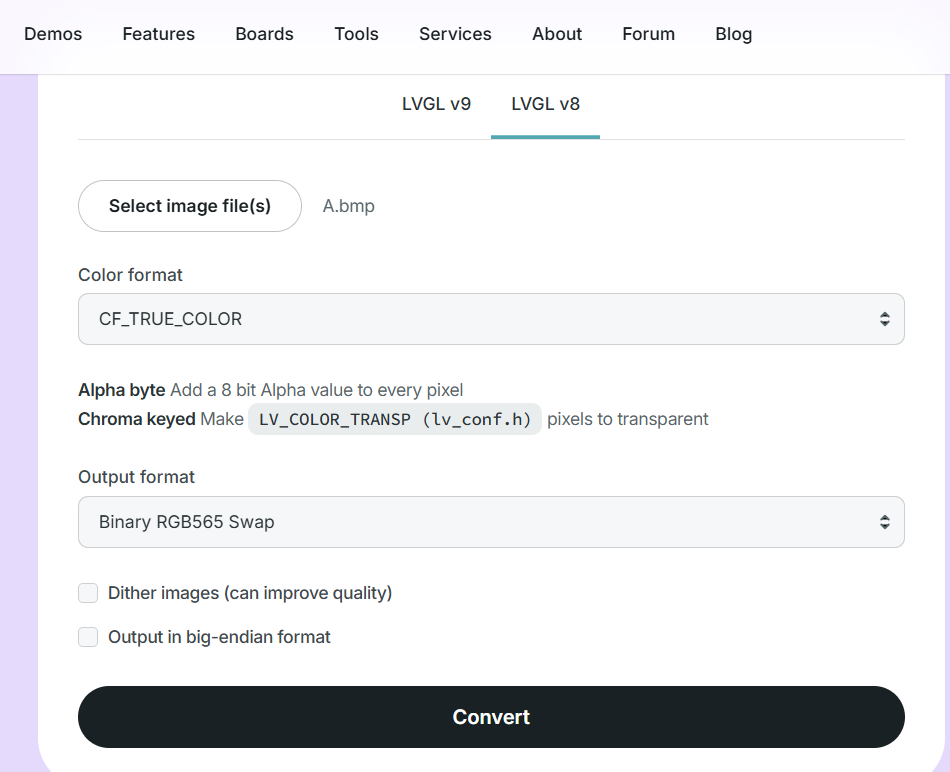
Burn the image resource to the specified flash location
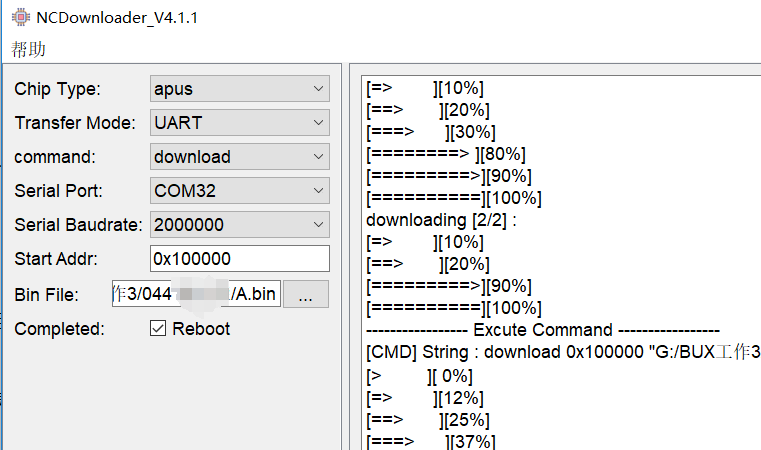
#define TO_XIP_ADDR(addr)   (unsigned char*)(0x13000000 + (unsigned int)addr)

const lv_img_dsc_t test_img_origin = {
  .header.always_zero = 0,
  .header.reserved = 0,
  .header.w = 240,
  .header.h = 135,
  .data_size = 240*135 * LV_COLOR_SIZE / 8,
  .header.cf = LV_IMG_CF_TRUE_COLOR,
  .data = TO_XIP_ADDR(0x100000+0x04), // The bin file generated by lvgl is read from the bin file. Each image bin has a 4-byte header at the beginning. Therefore, the image data needs to be offset by 4 bytes
};

static void normal_img_test(void)
{
    lv_obj_t * act_scr = lv_scr_act();
    if (act_scr)
    {
        lv_obj_clean(act_scr);
    }

    LV_IMG_DECLARE(test_img_origin);
    lv_obj_t * img1 = lv_img_create(lv_scr_act());
    lv_img_set_src(img1, &test_img_origin);
}
Important
If qgif is used, the generated bin file does not include the 4-byte header information, so no offset is needed
#define TO_XIP_ADDR(addr)   (unsigned char*)(0x13000000 + (unsigned int)addr)

const lv_img_dsc_t standby_ani = {
.header.cf = LV_IMG_CF_RAW_CHROMA_KEYED,
.header.always_zero = 0,
.header.reserved = 0,
.header.w = 360,
.header.h = 360,
.data_size = 672285,
.data = TO_XIP_ADDR(0xC00000),
};

static void *qgif_malloc(uint32_t size)
{
    return (void*)psram_malloc(size);
}

static void qgif_free(void *ptr)
{
    psram_free(ptr);
}

static void qgif_img_test(void)
{
    lv_obj_t * act_scr = lv_scr_act();
    if (act_scr)
    {
        lv_obj_clean(act_scr);
    }

    LV_IMG_DECLARE(standby_ani);
    lv_obj_t * qgif_gx96_obj = lv_qgif_create(lv_scr_act(), qgif_malloc, qgif_free);

    lv_qgif_set_src(qgif_gx96_obj, &standby_ani);
    lv_obj_align(qgif_gx96_obj, LV_ALIGN_CENTER, 0, 0);
}