Qiniu Cloud Device Binding and OTA*
1 Introduction*
This document mainly introduces the following features of the Qiniu Cloud platform:
- How to bind devices to the console
- How to upload a new firmware version to the cloud server and perform an upgrade
2 Smart Console*
The following introductions require you to register an account and create a new agent. You can register by clicking the link directly.
3 Binding Devices*
For demonstration purposes, the lightning repository uses a fixed Mac address by default and will automatically connect to a pre-registered agent. If you need to switch, refer to the instructions below.
3.1 SDK Code Modifications*
Open the file project/ln_model_public/app/common.h, set the macro definition CONFIG_LICENSE_ENABLE to 1, CONFIG_LICENSE_CHECK to 0, then compile and flash.
/**
* @addtogroup config
* @{
*/
#define CONFIG_LICENSE_ENABLE (1)
#define CONFIG_LICENSE_ERASE (0)
#define CONFIG_LICENSE_CHECK (0) /*!< Effective when CONFIG_LICENSE_ENABLE is 1, disabled by default for testing convenience, enable for mass production */
#define CONFIG_OTA_ENABLE (1)
/** @} */
3.2 Binding Method Introduction*
3.2.1 Device Pre-import Method*
- Connect to the
882log UART and check the printedMacaddress, for example,00:50:E0:49:1E:5Bbelow.+--------------- net device info ------------+ |netif hostname: ln_sta | |netif ip = 192.168.137.68 | |netif mask = 255.255.255.0 | |netif gateway = 192.168.137.1 | |netif mac : [00:50:E0:49:1E:5B] | +--------------------------------------------+ - Open the Smart Console to add a device. Follow the operations indicated by the red boxes in the images. The
Macaddress entered is the one printed in the log.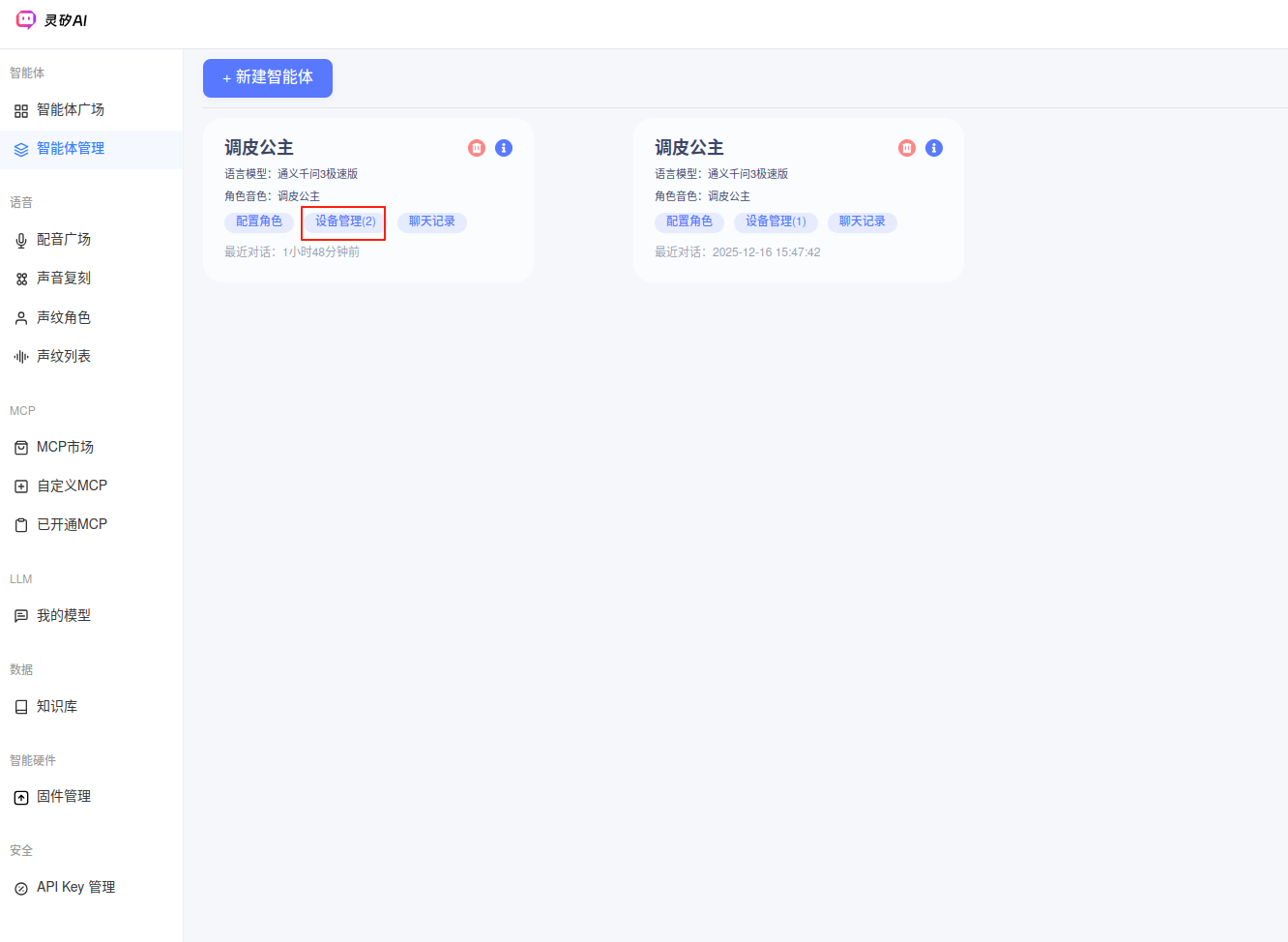
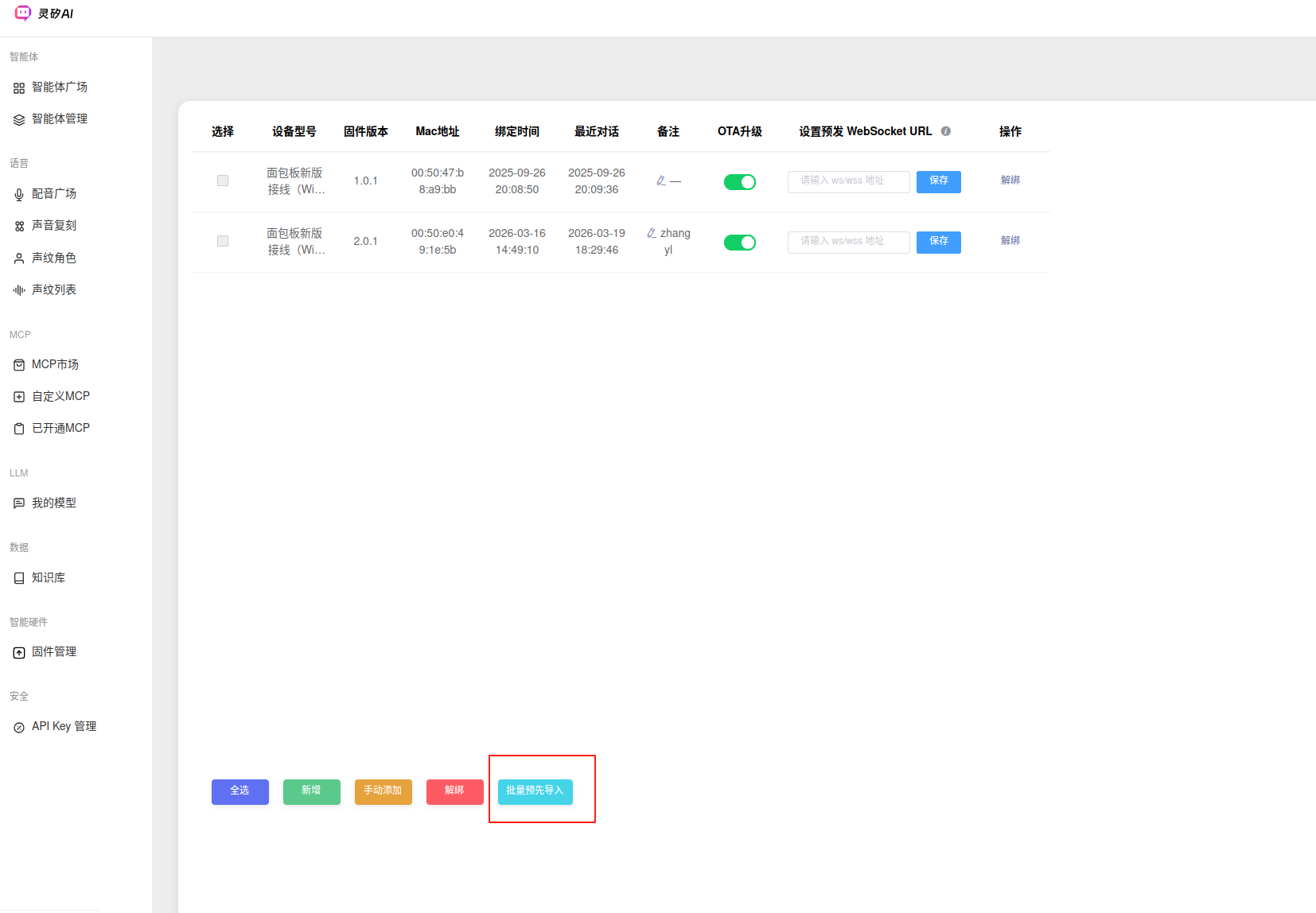
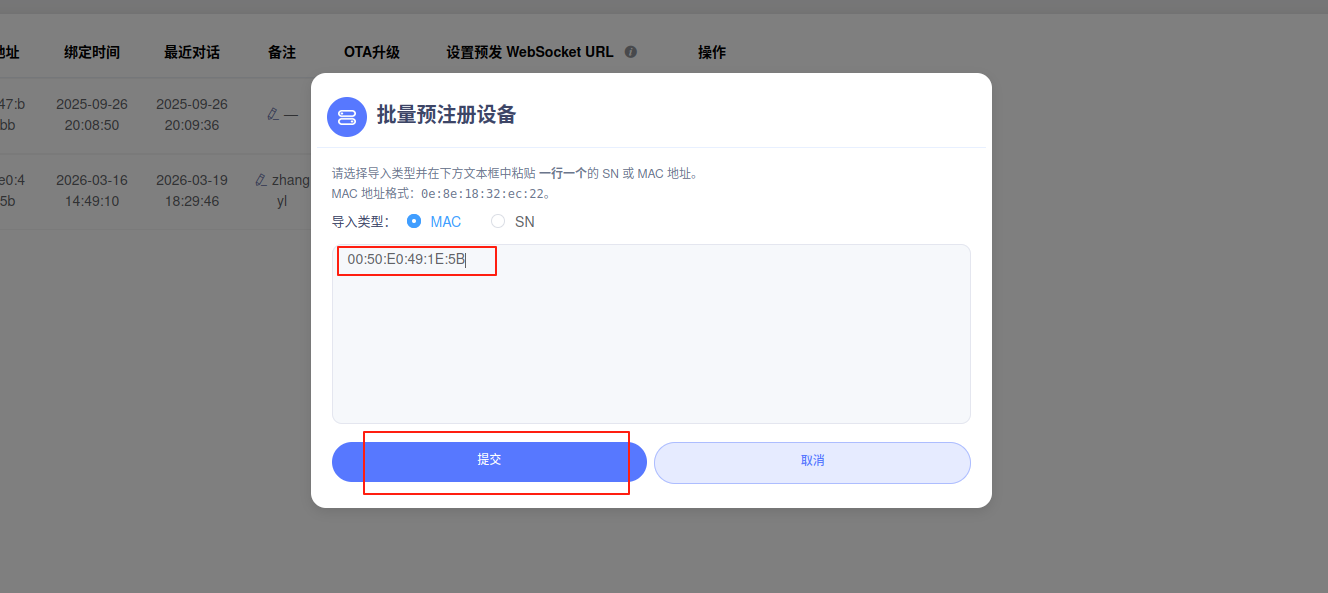
- Restart the device, refresh the device management page in the browser console, and check if the new device has been successfully added.
3.2.2 Device Verification Code Method*
Notes
- If the device is already bound, no activation code will be issued. You can unbind the device in the console to test this method.
- In the current code, the verification code method attempts 10 connections, with an 8-second delay between each retry. Please note the time for entering the verification code into the console.
- Connect to the
882log UART and check the printed verification code, for example,776693below.Invalid or missing fields in 'websocket.ws_token' object ***************************** * 776693 * ***************************** [I/HTTP] [http_check_version | 265] http check_version done, exit... ota_activate_thread_entry 2 free heap: 72400 Activating... 1/10 - Open the Smart Console. Follow the operations indicated by the red boxes in the images. The verification code entered is the one printed in the log.
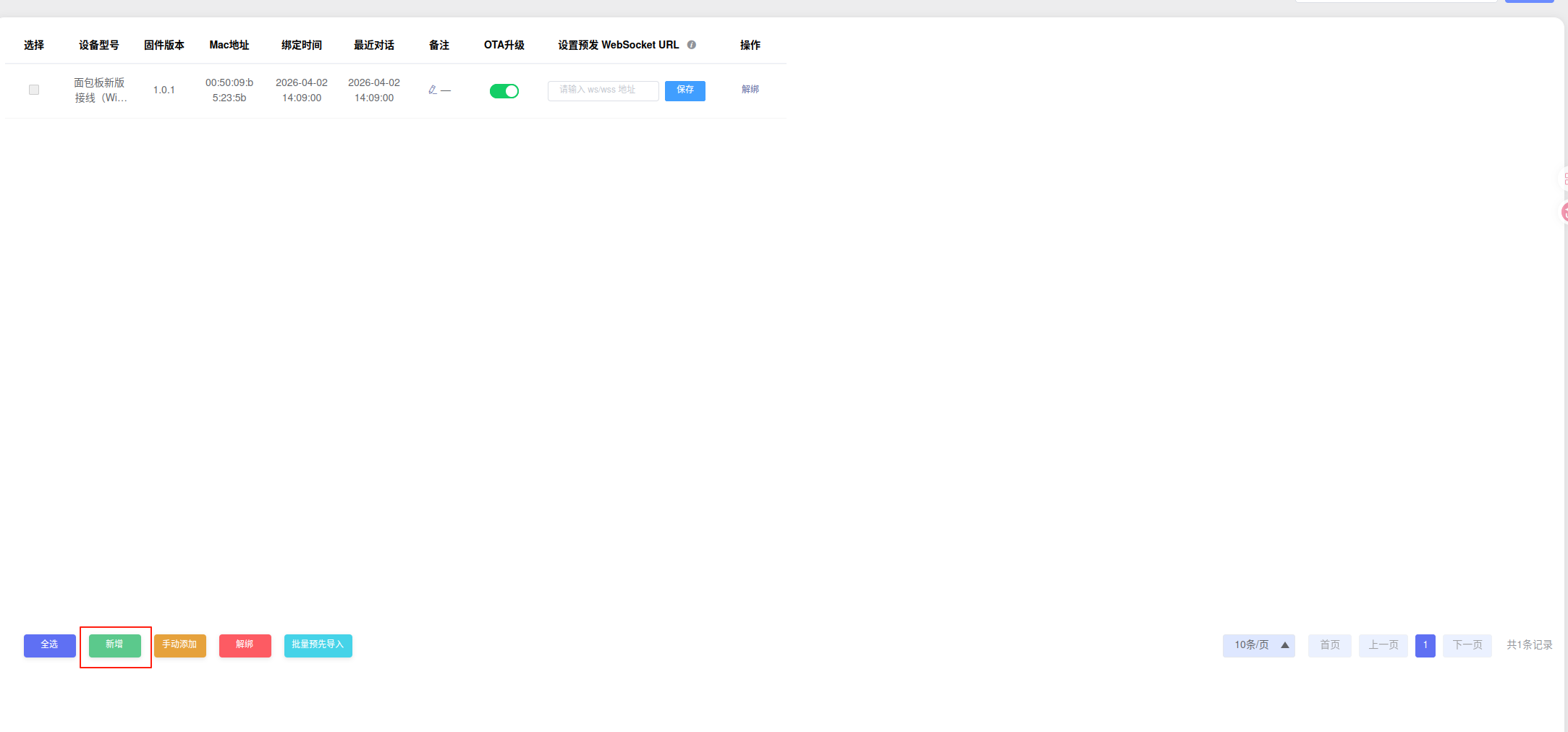
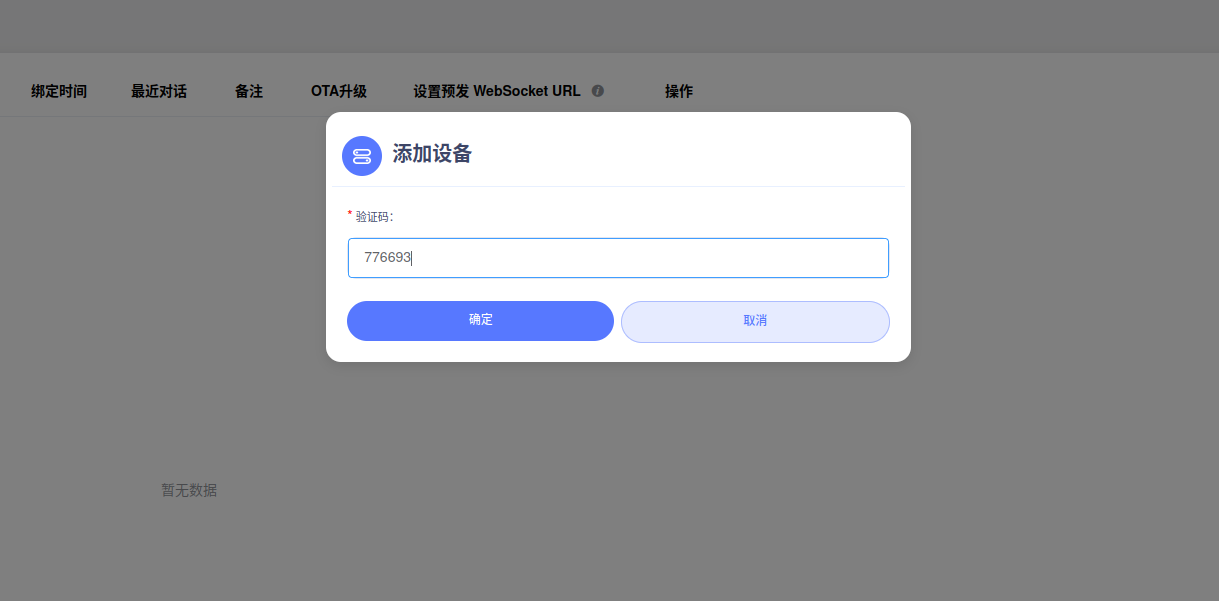
- Refresh the device management page in the browser console, and check if the new device has been successfully added.
4 OTA Upgrade 822*
4.1 Version Check Description*
Note
The version check for the upgrade includes two parts. By default, both parts are checked in the code. You can modify the code to decide whether to use check 2.
4.1.1 Check 1: APP Version Definition*
- The new upgrade version number must be greater than the old version
- Location: Modify
#define APP_VERSION "1.0.1"inproject/ln_model_public/app/board_info.h
4.1.2 Check 2: Version Number of the flashimage.bin File*
- The new upgrade version must be different from the old version
- Defined in
project/ln_model_public/cfg/proj_config.h/* * flash image settings */ #define FLASH_IMAGE_VER_MAJOR 0 #define FLASH_IMAGE_VER_MINOR 1 - To remove this check, you can comment out part of the code in
project/ln_model_public/app/servers/qiniu/ota_activate.c. Refer to:static bool ota_download_precheck(uint32_t app_offset, image_hdr_t *ota_hdr) { image_hdr_t *app_hdr = NULL; if (NULL == (app_hdr = OS_Malloc(sizeof(image_hdr_t)))) { LOG(LOG_LVL_ERROR, "[%s:%d] malloc failed.\r\n", __func__, __LINE__); return false; } if (OTA_ERR_NONE != image_header_fast_read(app_offset, app_hdr)) { LOG(LOG_LVL_ERROR, "failed to read app header.\r\n"); goto ret_err; } if ((ota_hdr->image_type == IMAGE_TYPE_ORIGINAL) || (ota_hdr->image_type == IMAGE_TYPE_ORIGINAL_XZ)) { #if !TEST_OTA_UPGRADE // check version // if (((ota_hdr->ver.ver_major << 8) + ota_hdr->ver.ver_minor) == // ((app_hdr->ver.ver_major << 8) + app_hdr->ver.ver_minor)) { // LOG(LOG_LVL_ERROR, "[%s:%d] same version, do not upgrade!\r\n", __func__, __LINE__); // goto ret_err; // } #endif // check file size if (((ota_hdr->img_size_orig + sizeof(image_hdr_t)) > APP_SPACE_SIZE) || ((ota_hdr->img_size_orig_xz + sizeof(image_hdr_t)) > OTA_SPACE_SIZE)) { LOG(LOG_LVL_ERROR, "[%s:%d] size check failed.\r\n", __func__, __LINE__); goto ret_err; } } else { // image type not support! goto ret_err; } OS_Free(app_hdr); return true; ret_err: OS_Free(app_hdr); return false; }
4.2 Upgrade Steps*
- Refer to the device binding steps to bind the device to the Smart Console, and set
CONFIG_LICENSE_ENABLEandCONFIG_OTA_ENABLEto1.- Compile and flash one image to the device.
- Update the version (the two version checks mentioned above) and compile another image to upload to the cloud.
- Define the version yourself and upload the newly compiled firmware to the cloud server.
- Note the version checks for both parts
- The firmware file to upload is the build output
build-ln_model_public-release/bin/flashimage-ota-xz-vx.x.bin - The BIN size must not exceed 680K. If it exceeds this limit, contact Liangniu personnel to modify the
project/ln_model_public/cfg/flash_partition_cfg.jsonfile.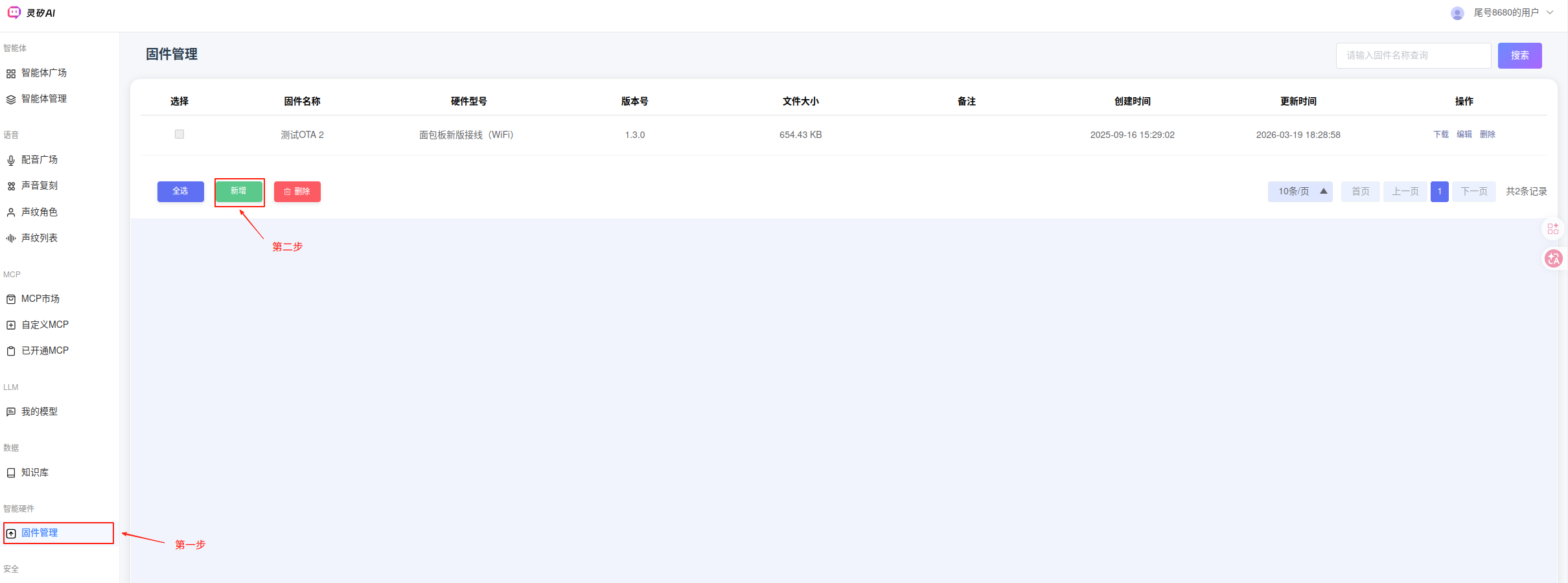
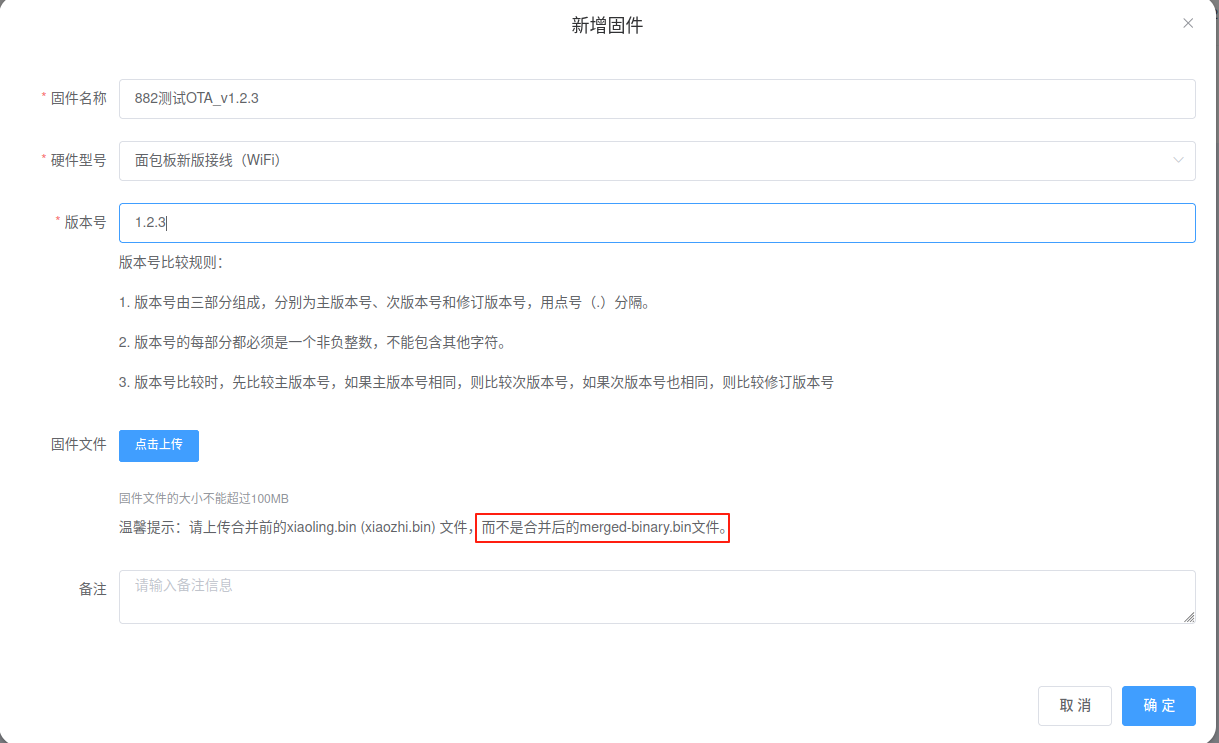
- The upgrade process is only triggered when a new version is detected at each power-on. Therefore, ensure the current board has the old firmware and restart the board.
- Key log descriptions
- Version check starts, current version 1.0.1:
wifi get ip callback [APP] netconfig connected OTA activate init free heap: 78224 =========== qiniu app version 1.0.1 =============================== [qiniu] ota_activate_thread_entry 1 free heap: 74016 [I/HTTP] [http_check_version | 240] http check_version start.!!! - New version 1.2.3 detected:
...omitted... ota_882h version: 1.2.3 ota_882h url: https://xrobot-storage.qnaigc.com/firmwares/1965326919608012801/61236c694db64ee79c2af15c9416cddd.bin ...omitted... Fonud new verison 1.2.3, do upgrade ... - Download process:
...omitted... write at flash: 0x0016d000, len:1167 write at flash: 0x0016e000, len:1167 write at flash: 0x0016f000, len:1167 [APP] Free Heap: 26616 write at flash: 0x00170000, len:1167 write at flash: 0x00171000, len:1167 write at flash: 0x00172000, len:1167 write at flash: 0x00173000, len:1167 ...omitted... - Verification and restart:
total received 670135 bytes. ota verify image ... Succeed to verify OTA image content. - New version information after restart:
wifi get ip callback
[APP] netconfig connected
OTA activate init free heap: 78224
===========     qiniu app version 1.2.3     ===============================
- Version check starts, current version 1.0.1:
5 OTA Upgrade 8006*
!!! Note: This example only downloads from a local server. If you need to download from the cloud, refer to the 882 process for development.
- File
project/ln_model_public/app/usr_app.cregisters the upgrade steps via theota_activate_on_activated()function.static void _network_manager_on_net_connected(void) { LOG(LOG_LVL_INFO, "[APP] netconfig connected\r\n"); smartbot_load_mode(); #if defined(CONFIG_OTA_ENABLE) && CONFIG_OTA_ENABLE ota_activate_on_activated(_ota_activate_on_activated); ota_activate_init(); #else _ota_activate_on_activated(); #endif /* CONFIG_OTA_ENABLE */ } - In file
project/ln_model_public/app/servers/qiniu/ota_activate.c, the lineif (_on_activated) _on_activated();enters the upgrade process.static void ota_activate_thread_entry(void *arg) { (void)(arg); while (!netdev_got_ip()) OS_MsDelay(100); LOG(LOG_LVL_INFO, "=========== qiniu app version %s ===============================\r\n", APP_VERSION); LOG(LOG_LVL_INFO, "[qiniu] ota_activate_thread_entry 1 free heap: %d\r\n", OS_GetFreeHeapSize()); http_check_version(URL_OTA_ACTIVATE); if (CFG.ota_882h.url[0] && CFG.ota_882h.version[0] && is_new_version(CFG.ota_882h.version)) { LOG(LOG_LVL_INFO, "Fonud new verison %s, do upgrade ...\r\n", CFG.ota_882h.version); LOG(LOG_LVL_INFO, "upgrade result: %d\r\n", ota_upgrade(CFG.ota_882h.url)); } LOG(LOG_LVL_INFO, "ota_activate_thread_entry 2 free heap: %d\r\n", OS_GetFreeHeapSize()); if (CFG.activate.act_challenging) ota_activate(URL_OTA_ACTIVATE); LOG(LOG_LVL_INFO, "ota_activate_thread_entry 3 free heap: %d\r\n", OS_GetFreeHeapSize()); if (_on_activated) _on_activated(); OS_ThreadDelete(&ota_activate_thread); } - File
project/ln_model_public/app/ota/ota_upgrade.cimplements the upgrade logic. You can read the code directly. - You can change the IP address in
#define URL_GX8006_VERSION_CHECK "http://192.168.111.190:8000/ota/version"for testing. - The Python script for the default test server is located at:
project/ln_model_public/app/test/ota_test_server.py. Note that you need to modify the IP. You can run this script and then restart the chip for testing.