GX8006 Large Model Development Kit*
1. Introduction*
- To accelerate the adaptation of WIFI/CAT1 module hardware (such as LN882H, etc.) to the GX8006 AI voice chip,
- This GX8006 development kit (link) provides a complete voice interaction solution, with its core achieving dual-chip collaboration through UART bidirectional communication.
- GX8006 features the following core capabilities:
- Wake word recognition: Supports "你好小智", "小智同学", "小美小美", etc.
- Supports AEC acoustic echo cancellation, enabling interrupt-wake interaction mode during playback
- Supports VAD voice activity detection, adapting to free-speech interaction mode
- Dynamic parameter configuration: Adjust microphone gain, multi-scenario dialogue modes, VAD sensitivity, noise reduction levels, custom wake words, dynamic switching between PCM and OPUS audio playback via UART commands, etc.
- Low-latency audio streaming: Supports high-definition audio uplink/downlink transmission and real-time playback based on Opus encoding
- The GX8006 development kit provides full-chain support:
- GX8006 SDK: Supports developers in secondary development
- SDK release requires signing an NDA
- Standardized UART protocol: Complete UART communication protocol, OTA upgrade guide, and interaction logic definitions
- Core firmware: GX8006 standard firmware
- Acoustic test suite: Acoustic test user guide (microphone/speaker)
- Development acceleration tools:
- Wake rate test environment setup standards
- WiFi host-side UART driver examples
- GX8006 SDK: Supports developers in secondary development
- GX8006 features the following core capabilities:
Custom Wake Word
- Developer self-training: For details, please read: Bunkws Automated Training Platform Setup
- Cloud servers can be used for training custom wake words + short commands
- You can set up your own server for training custom wake words + short commands
- Developers can also commission NationalChip for training through business channels
- For model deployment, refer to Kws Model Deployment Tool Documentation
2. Hardware Reference Design:*
-
Please read Development Board Hardware Reference Design - GX8006_WIFI Voice AI Large Model Solution for download
Important
- Please strictly follow the GX8006_WIFI Voice AI Large Model Solution hardware reference design for hardware design
- The schematics and PCB of the hardware reference design must be reviewed by NationalChip
2.1. Hardware Solution Block Diagram*
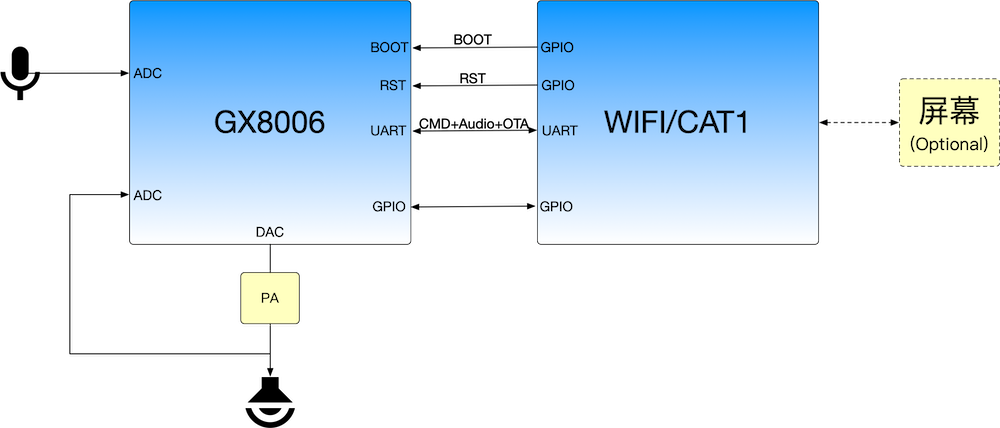
2.1.1. UART Audio Transmission Solution*
-
Hardware solution block diagram with playback on the GX8006 side
GX8006 Large Model Development Kit - Hardware Block Diagram (1) -
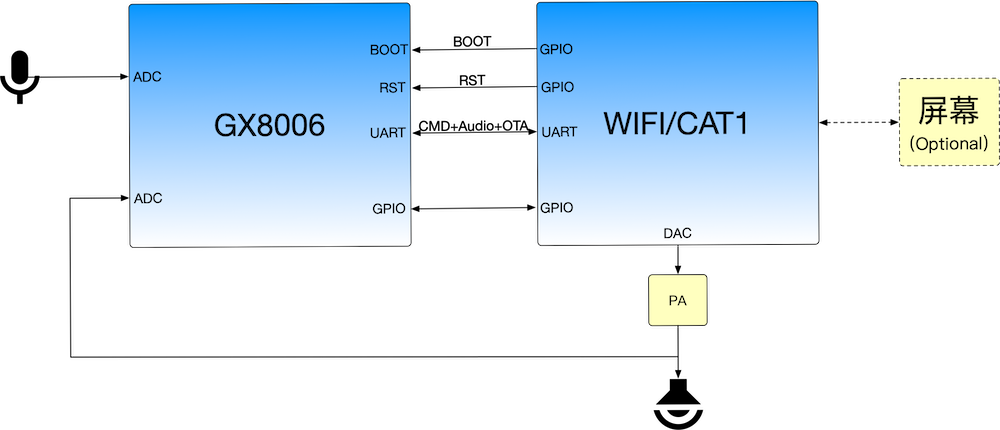
Hardware solution block diagram with playback on the WIFI/CAT1 side
Important
- This solution requires the WIFI/CAT1 to support audio decoding functionality
GX8006 Large Model Development Kit - Hardware Block Diagram (2)
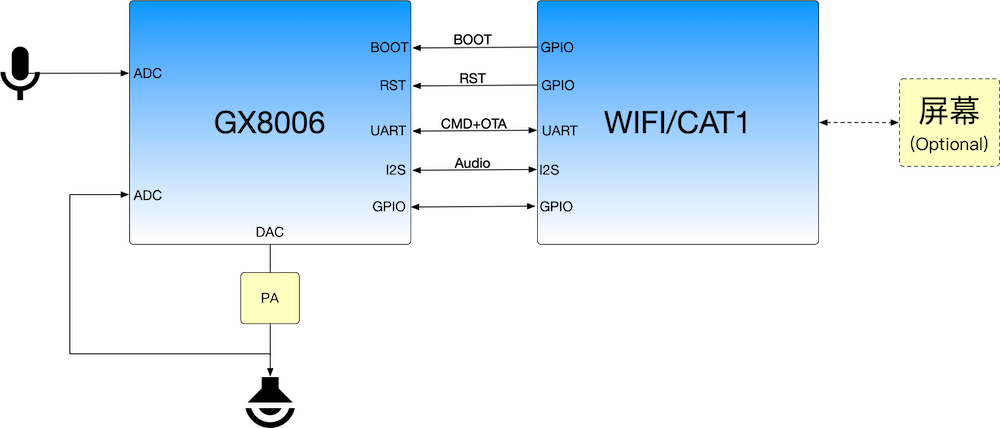
2.1.1. I2S Audio Transmission Solution*
-
Hardware solution block diagram with playback on the GX8006 side
Important
- This solution requires the WIFI/CAT1 to support audio encoding and decoding functionality
GX8006 Large Model Development Kit - Hardware Block Diagram (3) -
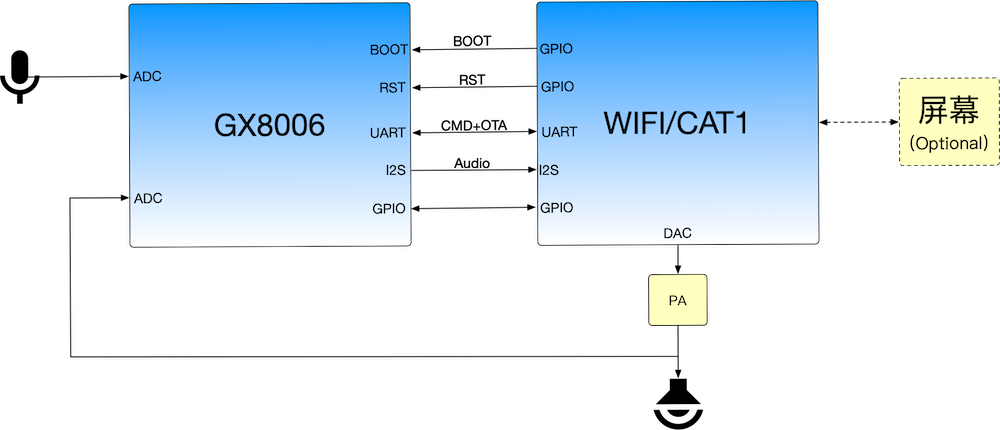
Hardware solution block diagram with playback on the WIFI/CAT1 side
Important
- This solution requires the WIFI/CAT1 to support audio encoding and decoding functionality
GX8006 Large Model Development Kit - Hardware Block Diagram (4)
2.2. System Solution Block Diagram*
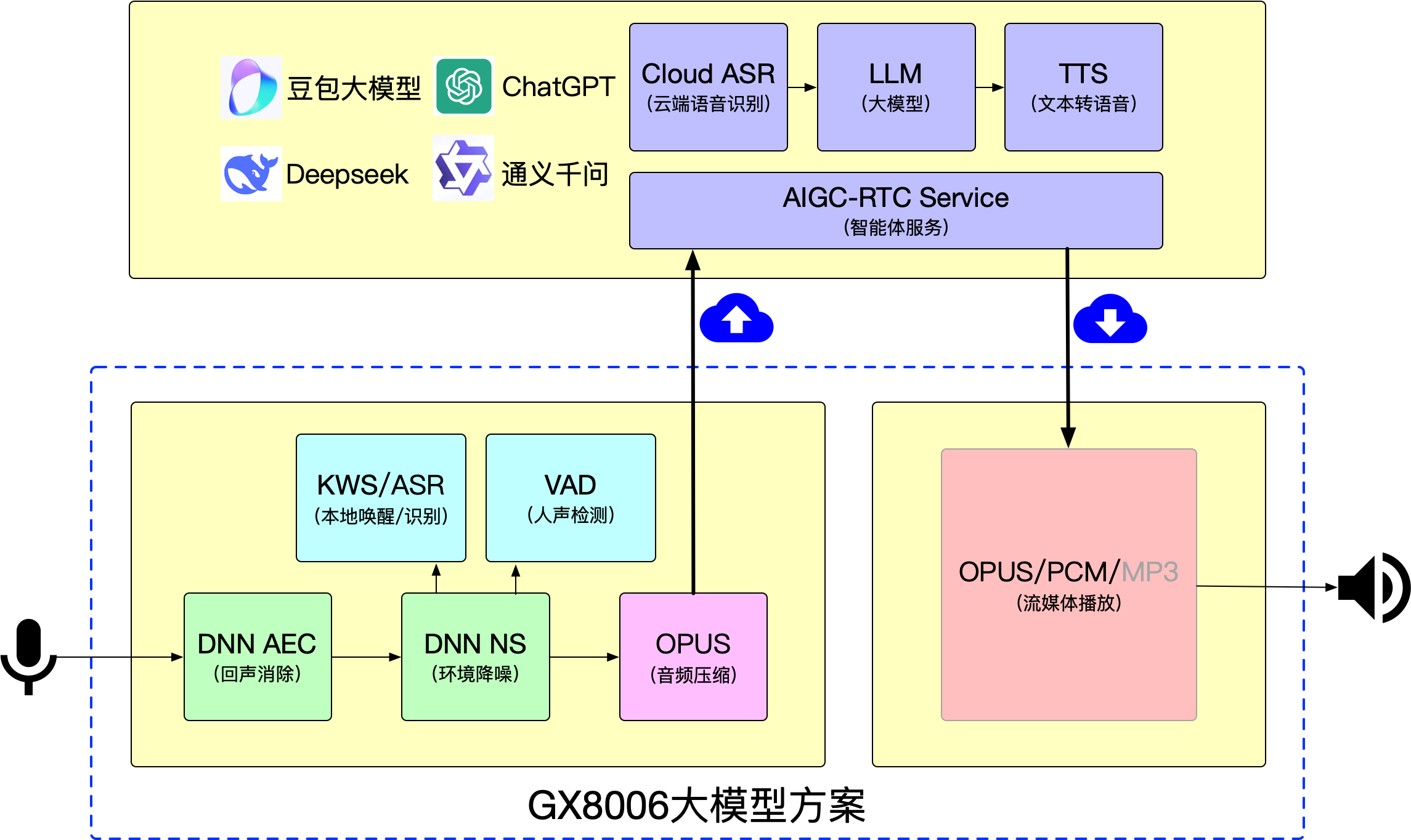
3. GX8006 Large Model Development Kit*
- GX8006 development kit - Network disk download address: http://yun.nationalchip.com:10000/l/GFrOHt
- GX8006 development kit - Network disk directory:
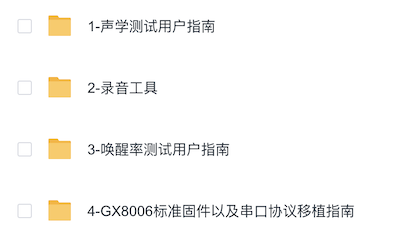
- 1-Acoustic Test User Guide: Used for developers to conduct microphone acoustic testing and speaker acoustic testing.
- 2-Recording Tool: Provides UART recording tools for Windows and Ubuntu. Developers need to use this tool for recording during acoustic testing. This tool requires flashing a separate recording firmware. Please download the 1-Acoustic Test User Guide to obtain it, which also includes recording method instructions.
- 3-Wake Rate Test User Guide: For developers to conduct wake rate testing.
- 4-GX8006 Standard Firmware and Serial Port Protocol Porting Guide:
- GX8006 Standard Firmware: Debug firmware for developers to adapt to their own modules.
- Supports KWS, wake words: Supports "你好小智", "小智同学", "小美小美"
- Supports AEC, VAD, NS
- Supports NationalChip offline voice protocol
- Serial Port Protocol: Developers need to carefully read 国芯微离线语音协议_v*.pdf for development on the WIFI/CAT1 side.
- For OTA, it is recommended to use bare-chip upgrade for firmware updates
- WAV to Opus Tool: See opus_tools_v*.zip, used to convert WAV files to Opus format for transmission to the GX8006 for playback. Note that this tool only supports 16K sampling rate, 16-bit, mono WAV files. The first 44 bytes of the generated Opus file are non-audio data and cannot be transmitted for playback. See README.md in the compressed package for usage.
- GX8006 Standard Firmware: Debug firmware for developers to adapt to their own modules.
- Other Tools:
- WIFI/CAT1-side UART protocol driver examples:
- SDK link: http://gitlab.nationalchip.com/nationalchip/voice-wifi-solution/lightning
- Reference directories:
- Dependent memory pool code:
components/utils/mempool - Dependent ring buffer code:
components/utils/ringbuffer - Audio buffer:
project/ln_model_public/app/audio - Serial port protocol implementation:
project/ln_model_public/app/smartbot
- Dependent memory pool code:
- GX8006 UART Protocol Host Script:
- SDK link: http://gitlab.nationalchip.com/nationalchip/voice-wifi-solution/ovp_aiot/
- Tool location in SDK:
tools/wifi_uart_pc_script/ - This tool can be used to verify MCU functionality and assist development
- Supports capturing Opus audio reported by the MCU and decoding it into WAV for saving
- Supports transmitting WAV audio for playback through the MCU (both Opus and PCM formats)
- Essentially, all commands supported by the serial port protocol are implemented in this tool. Refer to the tool source code for related functionality
- For unclear code implementations, you can provide the protocol and code to a large model for analysis
- GX8006 Custom Wake Word Tool:
- SDK link: http://gitlab.nationalchip.com/nationalchip/voice-wifi-solution/ovp_aiot/
- Tool location in SDK:
tools/kws_setup_tool/ - This script is used to generate serial port configuration commands for configuring GX8006 custom wake words. For documentation, see: Custom Wake Word Tool Documentation
- WIFI/CAT1-side UART protocol driver examples:
4. GX8006 Large Model Development Kit Version History*
- Please read the README.md in the GX8006 Development Kit