GALITE Acceleration Development Guide*
Chapter 1 Overview*
GALITE is a lightweight, low-power 2D image acceleration engine specifically designed for intelligent business applications.
Key Concepts*
- Bitmap: Complete image data, typically available in three types: Bitmap A, Bitmap B, and Bitmap D.
- Input Bitmap: The bitmap data to be processed. Bitmap A and Bitmap B are input bitmaps.
- Output Bitmap: The image data after processing. Bitmap D is the output bitmap.
Working Modes*
GALITE has two working modes: config mode and submit mode.
- config mode: In config mode, GALITE can only complete one image processing operation at a time. To process the next image, you must wait until the previous image processing is complete before resubmitting.
- submit mode: In submit mode, multiple image processing requests can be submitted at once.
Important Information
In submit mode, new image processing requests can only be submitted after previously submitted requests have been completed.
Bitmap Data Type Formats*
GALITE supports multiple bitmap data type formats:
- Input bitmap data formats
- CLUT4, CLUT8, A4, A8
- ARGB8888, ARGB4444, ARGB1555, BGR888, RGB565
- Output bitmap data formats
- CLUT4, CLUT8, A4, A8 (valid only in copy mode)
- ARGB8888, ARGB4444, ARGB1555, BGR888, RGB565
Important Information
In blend mode, Bitmap B does not support CLUT4, CLUT8, A4, A8 formats. Output bitmap formats support CLUT4, CLUT8, A4, A8 only in copy mode.
Chapter 2 Functional Features*
GALITE supports rectangle fill, image copy, image data type conversion (Blit), and image blending operations. Based on usage requirements, it can be divided into synchronous and asynchronous modes. All image processing is performed according to the SURFACE and RECT formats.
- SURFACE: Represents the bitmap data information to be processed. This includes bitmap width, height, bitmap address, bitmap data format, etc.
- RECT: Represents the region within the bitmap area that needs to be processed. This includes the starting x, y coordinates of the image, as well as the width and height to be processed.
Important Information
Synchronous and asynchronous modes cannot be used simultaneously.
Rectangle Fill*
Rectangle fill fills a rectangular region with a width of DestWidth and a height of DestHeight on an image with a base width of DestBaseWidth, using the fill color, targeting the destination address DestAddr.
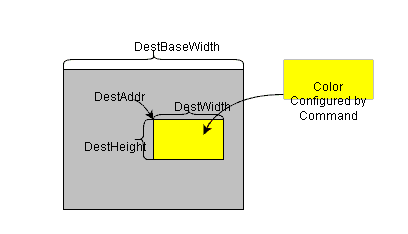
Rectangle fill can fill a specified rectangular region with a fixed color and supports scanline timing control. The gx_hal_ga_lite_fill function can be used to fill a rectangle within a specified region.
Example Code*
- Example code in config mode
static GX_HAL_GA_LITE ga_lite = {
    .regs = (void*)0xb6400000,
    .cmd_mode = GX_HAL_GA_LITE_CMD_MODE_CONFIGURE,
    .cmd_timeout = 0xFFFFFFFF,
};

static case_ga_fill(GX_HAL_GA_LITE *dev)
{
    GX_HAL_GA_SURFACE dst;
    GX_HAL_GA_RECT dst_rect;
    GX_HAL_GA_FILL_OPT opt;

    memset(&opt, 0, sizeof(GX_HAL_GA_FILL_OPT));

    dst.phy_addr = (uint32)VIRT_TO_PHY(buff);
    dst.width = width_base; //Image width
    dst.height = height_base; //Image height
    dst.color_format = GX_HAL_COLOR_ARGB8888;
    dst.endian = GX_HAL_LITTLE_ENDIAN;

    dst_rect.xpos = x; //X coordinate of the fill start address
    dst_rect.ypos = y; // Y coordinate of the fill start address
    dst_rect.width = width; // Width of the fill region
    dst_rect.height = height; // Height of the fill region

    opt.fill_color.color = color; //Fill color

    gx_hal_ga_lite_fill(dev, &dst, &dst_rect, &opt);
}

int main (int argc, char **argv)
{
    gx_hal_ga_lite_init(&ga_lite);
    case_ga_fill(&ga_lite);
    gx_hal_ga_lite_wait_done(&ga_lite);
    return 0;
}
- Example code in submit mode
static GX_HAL_GA_LITE ga_lite = {
    .regs = (void*)0xb6400000,
    .cmd_mode = GX_HAL_GA_LITE_CMD_MODE_SUBMIT,
    .cmd_timeout = 0xFFFFFFFF,
};

static case_ga_fill(GX_HAL_GA_LITE *dev)
{
    GX_HAL_GA_SURFACE dst;
    GX_HAL_GA_RECT dst_rect;
    GX_HAL_GA_FILL_OPT opt;

    memset(&opt, 0, sizeof(GX_HAL_GA_FILL_OPT));

    dst.phy_addr = (uint32)VIRT_TO_PHY(buff);
    dst.width = width_base; //Image width
    dst.height = height_base; //Image height
    dst.color_format = GX_HAL_COLOR_ARGB8888;
    dst.endian = GX_HAL_LITTLE_ENDIAN;

    dst_rect.xpos = x; //X coordinate of the fill start address
    dst_rect.ypos = y; // Y coordinate of the fill start address
    dst_rect.width = width; // Width of the fill region
    dst_rect.height = height; // Height of the fill region

    opt.fill_color.color = color; //Fill color

    gx_hal_ga_lite_begin(dev);
    gx_hal_ga_lite_fill(dev, &dst, &dst_rect, &opt);
    gx_hal_ga_lite_end(dev);
}

int main (int argc, char **argv)
{
    ga_lite.cmd.virt_addr = (uint32_t*)MALLOC(10 * GX_HAL_GA_CMD_LEN);
    ga_lite.cmd.phy_addr = VIRT_TO_PHY(ga_lite.cmd.virt_addr);
    ga_lite.cmd.cmd_max_num = 10;

    gx_hal_ga_lite_init(&ga_lite);
    case_ga_fill(&ga_lite);
    gx_hal_ga_lite_wait_done(&ga_lite);

    return 0;
}
Important Information
When the bitmap color format is RGB888, the x, y, width of the fill region and the bitmap width must be aligned to 4 pixels. When the bitmap color format is CLUT4/A4, the x, y, width of the fill region and the bitmap width must be aligned to 2 pixels.
Blit Function*
Blit copies a rectangular region with a width of SrcaWidth and a height of SrcaHeight from the starting address SrcaAddr of an image with a base width of SrcaBaseWidth to a destination region with a base width of DestBaseWidth, a destination start address of DestAddr, a destination width of DestWidth, and a height of DestHeight.
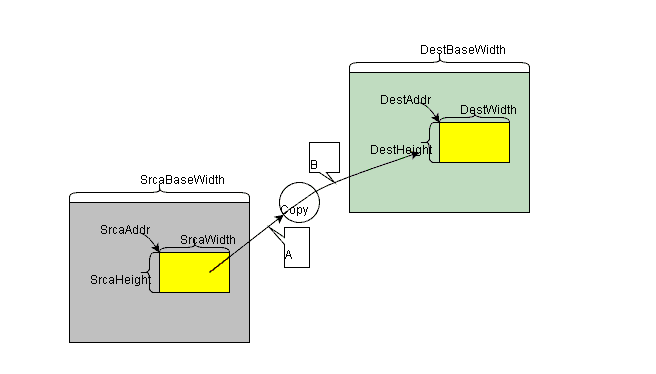
The Blit function supports bitmap format conversion, bitmap data format extension, scanline timing control, and other features. The gx_hal_ga_lite_blit function can be used to perform Blit operations on a rectangle within a specified region.
- Can Blit an entire image or just a region.
- Blit supports data type conversion; the source and destination bitmap formats can be different.
- Input bitmap format ARGB1555 supports Alpha extension. If alpha_extern is enabled, when A=1, alpha1 is used as the alpha value; when A=0, alpha0 is used as the alpha value.
- If the input bitmap format is A4/A8, the R, G, B values of extern_color must be set. extern_color will be extended with the A4 or A8 data into ARGB8888 type.
- If the input bitmap format is RGB, the alpha value of extern_color must be set. The alpha will extend the RGB data into ARGB8888 type.
- If the input bitmap format is CLUT4/CLUT8, the color table address must be set. The color table can be loaded once and reused until a new color table is loaded or the GA is reset.
Example Code*
- Example code in config mode
static GX_HAL_GA_LITE ga_lite = {
   .regs = (void*)0xb6400000,
   .cmd_mode = GX_HAL_GA_LITE_CMD_MODE_CONFIGURE,
   .cmd_timeout = 0xFFFFFFFF,
};

static case_ga_blit(GX_HAL_GA_LITE *dev)
{
   GX_HAL_GA_SURFACE src;
   GX_HAL_GA_RECT src_rect;
   GX_HAL_GA_SURFACE dst;
   GX_HAL_GA_RECT dst_rect;
   GX_HAL_GA_BLIT_OPT opt;

   memset(&opt, 0, sizeof(GX_HAL_GA_BLIT_OPT));

   src.phy_addr = (uint32)VIRT_TO_PHY(src_buff);
   src.width = src_width_base; //Bitmap A image width
   src.height = src_height_base; //Bitmap A image height
   src.color_format = GX_HAL_COLOR_ARGB8888;
   src.endian = GX_HAL_LITTLE_ENDIAN;

   src_rect.xpos = x0; //X coordinate of Bitmap A start address
   src_rect.ypos = y0; //Y coordinate of Bitmap A start address
   src_rect.width = width0; //Width of the Bitmap A Blit region
   src_rect.height = height0; //Height of the Bitmap A Blit region

   dst.phy_addr = (uint32)VIRT_TO_PHY(dst_buff);
   dst.width = dst_width_base; //Bitmap D image width
   dst.height = dst_height_base; //Bitmap D image height
   dst.color_format = GX_HAL_COLOR_ARGB8888;
   dst.endian = GX_HAL_LITTLE_ENDIAN;

   dst_rect.xpos = x1; //X coordinate of Bitmap D start address
   dst_rect.ypos = y1; // Y coordinate of Bitmap D start address
   dst_rect.width = width1; // Width of the Bitmap D Blit region
   dst_rect.height = height1; // Height of the Bitmap D Blit region

   gx_hal_ga_lite_blit(dev, &src, &src_rect, &dst, &dst_rect, &opt);

}

int main (int argc, char **argv)
{
   gx_hal_ga_lite_init(&ga_lite);
   case_ga_blit(&ga_lite);
   gx_hal_ga_lite_wait_done(&ga_lite);
   return 0;
}
- Example code in submit mode
static GX_HAL_GA_LITE ga_lite = {
    .regs = (void*)0xb6400000,
    .cmd_mode = GX_HAL_GA_LITE_CMD_MODE_SUBMIT,
    .cmd_timeout = 0xFFFFFFFF,
};

static case_ga_blit(GX_HAL_GA_LITE *dev)
{
    GX_HAL_GA_SURFACE src;
    GX_HAL_GA_RECT src_rect;
    GX_HAL_GA_SURFACE dst;
    GX_HAL_GA_RECT dst_rect;
    GX_HAL_GA_BLIT_OPT opt;

    memset(&opt, 0, sizeof(GX_HAL_GA_BLIT_OPT));

    src.phy_addr = (uint32)VIRT_TO_PHY(src_buff);
    src.width = src_width_base; //Bitmap A image width
    src.height = src_height_base; //Bitmap A image height
    src.color_format = GX_HAL_COLOR_ARGB8888;
    src.endian = GX_HAL_LITTLE_ENDIAN;

    src_rect.xpos = x0; //X coordinate of Bitmap A start address
    src_rect.ypos = y0; //Y coordinate of Bitmap A start address
    src_rect.width = width0; //Width of the Bitmap A Blit region
    src_rect.height = height0; //Height of the Bitmap A Blit region

    dst.phy_addr = (uint32)VIRT_TO_PHY(dst_buff);
    dst.width = dst_width_base; //Bitmap D image width
    dst.height = dst_height_base; //Bitmap D image height
    dst.color_format = GX_HAL_COLOR_ARGB8888;
    dst.endian = GX_HAL_LITTLE_ENDIAN;

    dst_rect.xpos = x1; //X coordinate of Bitmap D start address
    dst_rect.ypos = y1; // Y coordinate of Bitmap D start address
    dst_rect.width = width1; // Width of the Bitmap D Blit region
    dst_rect.height = height1; // Height of the Bitmap D Blit region

    gx_hal_ga_lite_begin(dev);
    gx_hal_ga_lite_blit(dev, &src, &src_rect, &dst, &dst_rect, &opt);
    gx_hal_ga_lite_end(dev);
}

int main (int argc, char **argv)
{
    ga_lite.cmd.virt_addr = (uint32_t*)MALLOC(10 * GX_HAL_GA_CMD_LEN);
    ga_lite.cmd.phy_addr = VIRT_TO_PHY(ga_lite.cmd.virt_addr);
    ga_lite.cmd.cmd_max_num = 10;

    gx_hal_ga_lite_init(&ga_lite);
    case_ga_blit(&ga_lite);
    gx_hal_ga_lite_wait_done(&ga_lite);

    return 0;
}
Important Information
When the bitmap color format is RGB888, the x, y, width of the operation region and the bitmap width must be aligned to 4 pixels. When the bitmap color format is CLUT4/A4, the x, y, width of the operation region and the bitmap width must be aligned to 2 pixels.
Copy Function*
Copy copies a rectangular region with a width of SrcaWidth and a height of SrcaHeight from the starting address SrcaAddr of an image with a base width of SrcaBaseWidth to a destination region with a base width of DestBaseWidth, a destination start address of DestAddr, a destination width of DestWidth, and a height of DestHeight.
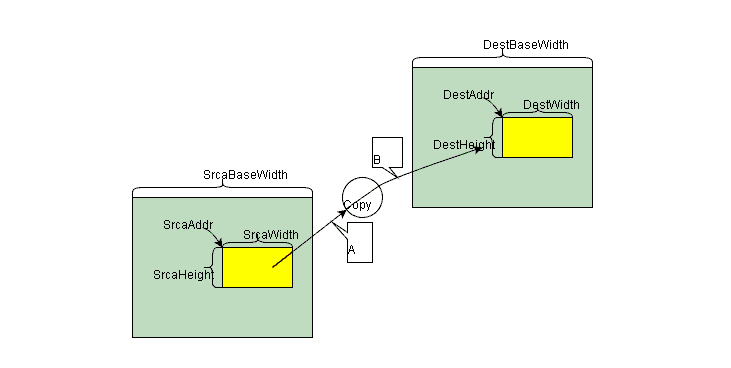
Bitmap copy is similar to a DMA function. The source and destination images must have the same color format. Scanline control is supported. The gx_hal_ga_lite_copy function can be used to copy a rectangle within a specified region.
Example Code*
- Example code in config mode
static GX_HAL_GA_LITE ga_lite = {
    .regs = (void*)0xb6400000,
    .cmd_mode = GX_HAL_GA_LITE_CMD_MODE_CONFIGURE,
    .cmd_timeout = 0xFFFFFFFF,
};

static case_ga_copy(GX_HAL_GA_LITE *dev)
{
    GX_HAL_GA_SURFACE src;
    GX_HAL_GA_RECT src_rect;
    GX_HAL_GA_SURFACE dst;
    GX_HAL_GA_RECT dst_rect;
    GX_HAL_GA_WAIT_OPT opt;

    memset(&opt, 0, sizeof(GX_HAL_GA_WAIT_OPT));

    src.phy_addr = (uint32)VIRT_TO_PHY(src_buff);
    src.width = src_width_base; //Bitmap A image width
    src.height = src_height_base; //Bitmap A image height
    src.color_format = GX_HAL_COLOR_ARGB8888;
    src.endian = GX_HAL_LITTLE_ENDIAN;

    src_rect.xpos = x0; //X coordinate of Bitmap A start address
    src_rect.ypos = y0; //Y coordinate of Bitmap A start address
    src_rect.width = width0; //Width of the Bitmap A Blit region
    src_rect.height = height0; //Height of the Bitmap A Blit region

    dst.phy_addr = (uint32)VIRT_TO_PHY(dst_buff);
    dst.width = dst_width_base; //Bitmap D image width
    dst.height = dst_height_base; //Bitmap D image height
    dst.color_format = GX_HAL_COLOR_ARGB8888;
    dst.endian = GX_HAL_LITTLE_ENDIAN;

    dst_rect.xpos = x1; //X coordinate of Bitmap D start address
    dst_rect.ypos = y1; // Y coordinate of Bitmap D start address
    dst_rect.width = width1; // Width of the Bitmap D Blit region
    dst_rect.height = height1; // Height of the Bitmap D Blit region

    gx_hal_ga_lite_copy(dev, &src, &src_rect, &dst, &dst_rect, &opt);

}

int main (int argc, char **argv)
{
    gx_hal_ga_lite_init(&ga_lite);
    case_ga_copy(&ga_lite);
    gx_hal_ga_lite_wait_done(&ga_lite);
    return 0;
}
- Example code in submit mode
static GX_HAL_GA_LITE ga_lite = {
    .regs = (void*)0xb6400000,
    .cmd_mode = GX_HAL_GA_LITE_CMD_MODE_SUBMIT,
    .cmd_timeout = 0xFFFFFFFF,
};

static case_ga_copy(GX_HAL_GA_LITE *dev)
{
    GX_HAL_GA_SURFACE src;
    GX_HAL_GA_RECT src_rect;
    GX_HAL_GA_SURFACE dst;
    GX_HAL_GA_RECT dst_rect;
    GX_HAL_GA_WAIT_OPT opt;

    memset(&opt, 0, sizeof(GX_HAL_GA_WAIT_OPT));

    src.phy_addr = (uint32)VIRT_TO_PHY(src_buff);
    src.width = src_width_base; //Bitmap A image width
    src.height = src_height_base; //Bitmap A image height
    src.color_format = GX_HAL_COLOR_ARGB8888;
    src.endian = GX_HAL_LITTLE_ENDIAN;

    src_rect.xpos = x0; //X coordinate of Bitmap A start address
    src_rect.ypos = y0; //Y coordinate of Bitmap A start address
    src_rect.width = width0; //Width of the Bitmap A Blit region
    src_rect.height = height0; //Height of the Bitmap A Blit region

    dst.phy_addr = (uint32)VIRT_TO_PHY(dst_buff);
    dst.width = dst_width_base; //Bitmap D image width
    dst.height = dst_height_base; //Bitmap D image height
    dst.color_format = GX_HAL_COLOR_ARGB8888;
    dst.endian = GX_HAL_LITTLE_ENDIAN;

    dst_rect.xpos = x1; //X coordinate of Bitmap D start address
    dst_rect.ypos = y1; // Y coordinate of Bitmap D start address
    dst_rect.width = width1; // Width of the Bitmap D Blit region
    dst_rect.height = height1; // Height of the Bitmap D Blit region

    gx_hal_ga_lite_begin(dev);
    gx_hal_ga_lite_copy(dev, &src, &src_rect, &dst, &dst_rect, &opt);
    gx_hal_ga_lite_end(dev);

}

int main (int argc, char **argv)
{
    ga_lite.cmd.virt_addr = (uint32_t*)MALLOC(10 * GX_HAL_GA_CMD_LEN);
    ga_lite.cmd.phy_addr = VIRT_TO_PHY(ga_lite.cmd.virt_addr);
    ga_lite.cmd.cmd_max_num = 10;

    gx_hal_ga_lite_init(&ga_lite);
    case_ga_copy(&ga_lite);
    gx_hal_ga_lite_wait_done(&ga_lite);

    return 0;
}
Important Information
When the bitmap color format is RGB888, the x, y, width of the operation region and the bitmap width must be aligned to 4 pixels. When the bitmap color format is CLUT4/A4, the x, y, width of the operation region and the bitmap width must be aligned to 2 pixels.
Blend Function*
The blend function is a dual-operand operation. The source and destination are blended according to different blend formulas, and the results of the source and destination blends are added together to produce the final blend result.
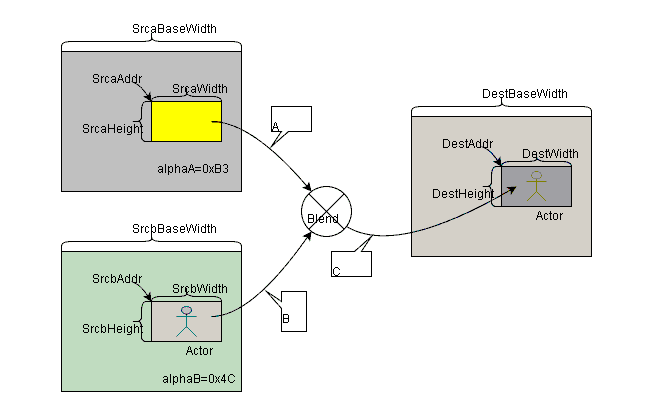
Blend operations are divided into fill color blending and bitmap blending. Both types support two major categories of blend functions: color blending and alpha blending. Bitmap data format extension, alpha output replacement, and scanline timing control are also supported. The gx_hal_ga_lite_blend or gx_hal_ga_lite_fill_and_blend functions can be used to blend a rectangle within a specified region.
- Bitmap blending: The color formats of Bitmap A, Bitmap B, and the destination image can be different.
- Fill color blending: The fill color is blended with Bitmap B. The color formats of Bitmap B and the destination image can be different.
- Input bitmap format ARGB1555 supports Alpha extension. If alpha_extern is enabled, when A=1, alpha1 is used as the alpha value; when A=0, alpha0 is used as the alpha value.
- The output bitmap supports alpha replacement, replacing the output alpha with alpha_out.
- If the input bitmap format is A4/A8, the R, G, B values of src_global_color must be set. src_global_color will be extended with the A4 or A8 data into ARGB type.
- If the input bitmap format is RGB, the alpha value of src_global_color or dst_global_color must be set. The alpha will extend the RGB data into ARGB8888 type.
- If the input bitmap format is CLUT4/CLUT8, the color table address must be set. The color table can be loaded once and reused until a new color table is loaded or the GA is reset.
Example Code*
- Example code in config mode
static GX_HAL_GA_LITE ga_lite = {
    .regs = (void*)0xb6400000,
    .cmd_mode = GX_HAL_GA_LITE_CMD_MODE_CONFIGURE,
    .cmd_timeout = 0xFFFFFFFF,
};

static case_ga_blend(GX_HAL_GA_LITE *dev)
{
    GX_HAL_GA_SURFACE srca;
    GX_HAL_GA_RECT srca_rect;
    GX_HAL_GA_SURFACE srcb;
    GX_HAL_GA_RECT srcb_rect;
    GX_HAL_GA_SURFACE dst;
    GX_HAL_GA_RECT dst_rect;
    GX_HAL_GA_BLEND_OPT opt;

    memset(&opt, 0, sizeof(GX_HAL_GA_BLEND_OPT));

    srca.phy_addr = (uint32)VIRT_TO_PHY(srca_buff);
    srca.width = srca_width_base; //Bitmap A image width
    srca.height = srca_height_base; //Bitmap A image height
    srca.color_format = GX_HAL_COLOR_ARGB8888;
    srca.endian = GX_HAL_LITTLE_ENDIAN;

    srca_rect.xpos = x0; //X coordinate of Bitmap A start address
    srca_rect.ypos = y0; //Y coordinate of Bitmap A start address
    srca_rect.width = width0; //Width of the Bitmap A Blit region
    srca_rect.height = height0; //Height of the Bitmap A Blit region

    srcb.phy_addr = (uint32)VIRT_TO_PHY(srcb_buff);
    srcb.width = srcb_width_base; //Bitmap B image width
    srcb.height = srcb_height_base; //Bitmap B image height
    srcb.color_format = GX_HAL_COLOR_ARGB8888;
    srcb.endian = GX_HAL_LITTLE_ENDIAN;

    srcb_rect.xpos = x1; //X coordinate of Bitmap B start address
    srcb_rect.ypos = y1; //Y coordinate of Bitmap B start address
    srcb_rect.width = width1; //Width of the Bitmap B Blit region
    srcb_rect.height = height1; //Height of the Bitmap B Blit region

    dst.phy_addr = (uint32)VIRT_TO_PHY(dst_buff);
    dst.width = dst_width_base; //Bitmap D image width
    dst.height = dst_height_base; //Bitmap D image height
    dst.color_format = GX_HAL_COLOR_ARGB8888;
    dst.endian = GX_HAL_LITTLE_ENDIAN;

    dst_rect.xpos = x2; //X coordinate of Bitmap D start address
    dst_rect.ypos = y2; // Y coordinate of Bitmap D start address
    dst_rect.width = width2; // Width of the Bitmap D Blit region
    dst_rect.height = height2; // Height of the Bitmap D Blit region

    opt.src_alpha_blend_fun = GX_HAL_MIX_FUNC_ONE;
    opt.src_color_blend_fun = GX_HAL_MIX_FUNC_ONE;
    opt.dst_alpha_blend_fun = GX_HAL_MIX_FUNC_ZERO;
    opt.dst_color_blend_fun = GX_HAL_MIX_FUNC_ZERO;

    gx_hal_ga_lite_blend(dev, &srca, &srca_rect, &srcb, &srcb_rect, &dst, &dst_rect, &opt);

}

int main (int argc, char **argv)
{
    gx_hal_ga_lite_init(&ga_lite);
    case_ga_blend(&ga_lite);
    gx_hal_ga_lite_wait_done(&ga_lite);
    return 0;
}
- Example code in submit mode
static GX_HAL_GA_LITE ga_lite = {
    .regs = (void*)0xb6400000,
    .cmd_mode = GX_HAL_GA_LITE_CMD_MODE_SUBMIT,
    .cmd_timeout = 0xFFFFFFFF,
};

static case_ga_copy(GX_HAL_GA_LITE *dev)
{
    GX_HAL_GA_SURFACE srca;
    GX_HAL_GA_RECT srca_rect;
    GX_HAL_GA_SURFACE srcb;
    GX_HAL_GA_RECT srcb_rect;
    GX_HAL_GA_SURFACE dst;
    GX_HAL_GA_RECT dst_rect;
    GX_HAL_GA_BLEND_OPT opt;

    memset(&opt, 0, sizeof(GX_HAL_GA_BLEND_OPT));

    srca.phy_addr = (uint32)VIRT_TO_PHY(srca_buff);
    srca.width = srca_width_base; //Bitmap A image width
    srca.height = srca_height_base; //Bitmap A image height
    srca.color_format = GX_HAL_COLOR_ARGB8888;
    srca.endian = GX_HAL_LITTLE_ENDIAN;

    srca_rect.xpos = x0; //X coordinate of Bitmap A start address
    srca_rect.ypos = y0; //Y coordinate of Bitmap A start address
    srca_rect.width = width0; //Width of the Bitmap A Blit region
    srca_rect.height = height0; //Height of the Bitmap A Blit region

    srcb.phy_addr = (uint32)VIRT_TO_PHY(srcb_buff);
    srcb.width = srcb_width_base; //Bitmap B image width
    srcb.height = srcb_height_base; //Bitmap B image height
    srcb.color_format = GX_HAL_COLOR_ARGB8888;
    srcb.endian = GX_HAL_LITTLE_ENDIAN;

    srcb_rect.xpos = x1; //X coordinate of Bitmap B start address
    srcb_rect.ypos = y1; //Y coordinate of Bitmap B start address
    srcb_rect.width = width1; //Width of the Bitmap B Blit region
    srcb_rect.height = height1; //Height of the Bitmap B Blit region

    dst.phy_addr = (uint32)VIRT_TO_PHY(dst_buff);
    dst.width = dst_width_base; //Bitmap D image width
    dst.height = dst_height_base; //Bitmap D image height
    dst.color_format = GX_HAL_COLOR_ARGB8888;
    dst.endian = GX_HAL_LITTLE_ENDIAN;

    dst_rect.xpos = x2; //X coordinate of Bitmap D start address
    dst_rect.ypos = y2; // Y coordinate of Bitmap D start address
    dst_rect.width = width2; // Width of the Bitmap D Blit region
    dst_rect.height = height2; // Height of the Bitmap D Blit region

    opt.src_alpha_blend_fun = GX_HAL_MIX_FUNC_ONE;
    opt.src_color_blend_fun = GX_HAL_MIX_FUNC_ONE;
    opt.dst_alpha_blend_fun = GX_HAL_MIX_FUNC_ZERO;
    opt.dst_color_blend_fun = GX_HAL_MIX_FUNC_ZERO;

    gx_hal_ga_lite_begin(dev);
    gx_hal_ga_lite_blend(dev, &srca, &srca_rect, &srcb, &srcb_rect, &dst, &dst_rect, &opt);
    gx_hal_ga_lite_end(dev);

}

int main (int argc, char **argv)
{
    ga_lite.cmd.virt_addr = (uint32_t*)MALLOC(10 * GX_HAL_GA_CMD_LEN);
    ga_lite.cmd.phy_addr = VIRT_TO_PHY(ga_lite.cmd.virt_addr);
    ga_lite.cmd.cmd_max_num = 10;

    gx_hal_ga_lite_init(&ga_lite);
    case_ga_blend(&ga_lite);
    gx_hal_ga_lite_wait_done(&ga_lite);

    return 0;
}
Important Information
When the bitmap color format is RGB888, the x, y, width of the operation region and the bitmap width must be aligned to 4 pixels. When the bitmap color format is CLUT4/A4, the x, y, width of the operation region and the bitmap width must be aligned to 2 pixels.
Chapter 3 Synchronous and Asynchronous Modes*
The HAL interface provides both synchronous and asynchronous modes for different usage scenarios.
Synchronous Mode*
In synchronous mode, the function returns only after waiting for the GA working state to be checked in a loop and the GA operation to complete.
Example Code*
Using the fill function as an example, in synchronous mode, the gx_hal_ga_lite_wait_done interface must be used to wait for the GA operation to complete.
- config mode
static GX_HAL_GA_LITE ga_lite = {
    .regs = (void*)0xb6400000,
    .cmd_mode = GX_HAL_GA_LITE_CMD_MODE_SUBMIT,
    .cmd_timeout = 0xFFFFFFFF,
};

static case_ga_fill(GX_HAL_GA_LITE *dev)
{
    GX_HAL_GA_SURFACE dst;
    GX_HAL_GA_RECT dst_rect;
    GX_HAL_GA_FILL_OPT opt;

    memset(&opt, 0, sizeof(GX_HAL_GA_FILL_OPT));

    dst.phy_addr = (uint32)VIRT_TO_PHY(buff);
    dst.width = width_base; //Image width
    dst.height = height_base; //Image height
    dst.color_format = GX_HAL_COLOR_ARGB8888;
    dst.endian = GX_HAL_LITTLE_ENDIAN;

    dst_rect.xpos = x; //X coordinate of the fill start address
    dst_rect.ypos = y; // Y coordinate of the fill start address
    dst_rect.width = width; // Width of the fill region
    dst_rect.height = height; // Height of the fill region

    opt.fill_color.color = color; //Fill color

    gx_hal_ga_lite_begin(dev);
    gx_hal_ga_lite_fill(dev, &dst, &dst_rect, &opt);
    gx_hal_ga_lite_end(dev);
}

int main (int argc, char **argv)
{
    ga_lite.cmd.virt_addr = (uint32_t*)MALLOC(10 * GX_HAL_GA_CMD_LEN);
    ga_lite.cmd.phy_addr = VIRT_TO_PHY(ga_lite.cmd.virt_addr);
    ga_lite.cmd.cmd_max_num = 10;

    gx_hal_ga_lite_init(&ga_lite);
    case_ga_fill(&ga_lite);
    gx_hal_ga_lite_wait_done(&ga_lite);

    return 0;
}
- submit mode
```c static GX_HAL_GA_LITE ga_lite = { .regs = (void*)0xb6400000, .cmd_mode = GX_HAL_GA_LITE_CMD_MODE_SUBMIT, .cmd_timeout = 0xFFFFFFFF, };
static case_ga_fill(GX_HAL_GA_LITE *dev) { GX_HAL_GA_SURFACE dst; GX_HAL_GA_RECT dst_rect; GX_HAL_GA_FILL_OPT opt;
1 2 3 4 5 6 7 8 9 10 11 12 13 14 15 16 17 18 | |
}
int main (int argc, char **argv) { ga_lite.cmd.virt_addr = (uint32_t*)MALLOC(10 * GX_HAL_GA_CMD_LEN); ga_lite.cmd.phy_addr = VIRT_TO_PHY(ga_lite.cmd.virt_addr); ga_lite.cmd.cmd_max_num = 10;
1 2 | |