LVP工程XIP使用指南*
在嵌入是系统中,为了减少对内存的占用,通常会使用 XIP(eXecute In Place) 技术。下面几个链接可以帮助了解 XIP 是个什么东西。
1. 如何开启XIP*
- 打开
make menuconfig,进入MCU setting菜单,如下图所示: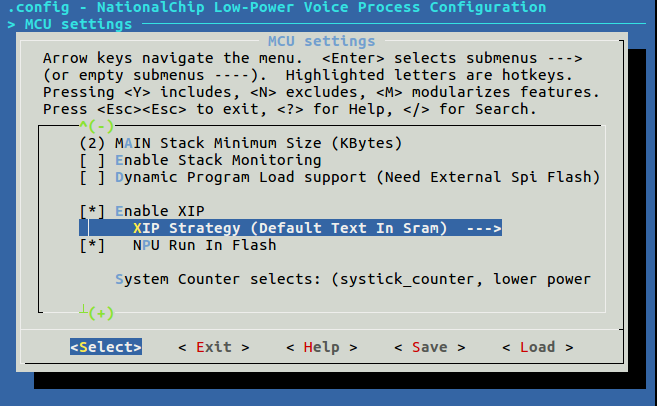
- 勾上上图的
Enable XIP选项,就可以根据需求决策CPU、NPU是否run in flash。LVP工程提供了三种组合:- CPU run in flash, NPU run in sram:
XIP Strategy选择Default Text In Flash- *不要勾选 *
NPU Run In Flash
- CPU run in sram, NPU run in flash
XIP Strategy选择Default Text In Sram- 勾选
NPU Run In Flash
- CPU run in flash, NPU run in flash
XIP Strategy选择Default Text In Flash- 勾选
NPU Run In Flash
- CPU run in flash, NPU run in sram:
1.1 CPU run in flash (Default Text In Flash)*
通常来说,只要 XIP Strategy 选择 Default Text In Flash,那么 .text 和 .rodata 就会默认通过 xip 运行。请看工程的链接脚本,如下:
| arch/soc/grus/link.ld | |
|---|---|
1 2 3 4 5 6 7 8 9 10 11 12 13 14 15 16 17 18 19 20 21 22 23 24 25 26 27 28 29 30 31 32 | |
XIP Strategy选择Default Text In Flash,那么宏CONFIG_MCU_DEFAULT_TEXT_IN_FLASH会被定义;- 再来看上面的
link.ld脚本高亮部分,分别表示是宏 RUN_AT_STAGE2_TEXT(必须放在sram中的 .o 文件) 意外的 .o 文件会默认放到 xip 中。
注意
- 如果某些函数不需要放到flash中运行,可以在函数定义的前面添加
__attribute__((section(".sram_text"))),比如上面高亮中的宏lvp/common/snpu_engine/lvp_kws.c 1 2 3 4 5 6 7 8 9 10 11 12 13 14 15
...省略一万行 #ifdef CONFIG_LVP_ENABLE_KEYWORD_RECOGNITION DRAM0_STAGE2_SRAM_ATTR static int _SnpuCallback(int module_id, GX_SNPU_STATE state, void *priv) { if (s_snpu_callback && priv) { s_snpu_callback(module_id, state, priv); } # ifdef CONFIG_ENABLE_NPU_CYCLE_STATISTIC s_end_ms = gx_get_time_ms(); printf ("npu:%d ms\n", s_end_ms - s_start_ms); # endif return 0; } #endif ...省略一万行DRAM0_STAGE2_SRAM_ATTR其实就是__attribute__((section(".sram_text"))),它在inclue/lvp_attr.h中有定义。 - 如果某些 .o 文件都要放在
sram中运行,那么可以参考link.ld中的RUN_AT_STAGE2_TEXT的方式仿照抄下。
1.2 NPU Run In Flash*
- 首先先看
LVP工程的链接脚本,如下,我们会将.cmd和.weight等section通过xip来读取。arch/soc/grus/link.ld 1 2 3 4 5 6 7 8 9 10 11 12 13 14 15 16 17 18 19 20 21 22 23 24 25 26 27 28 29 30 31
...省略一万行 #ifdef CONFIG_MCU_ENABLE_XIP .stage2_xip_text : STAGE2_XIP_TEXT_LMA { _stage2_xip_start_text_ = .; ...省略一万行 # ifdef CONFIG_NPU_RUN_IN_FLASH . = ALIGN(4); KEEP(*(.cmd*)) . = ALIGN(4); KEEP(*(.weight*)) . = ALIGN(4); KEEP(*(.npu_section*)) . = ALIGN(4); KEEP(*(.vp_cmd*)) . = ALIGN(4); KEEP(*(.vp_weight*)) . = ALIGN(4); KEEP(*(.vp_npu_section*)) # endif ...省略一万行 . = ALIGN(4); _stage2_xip_end_text_ = .; } > stage2_xip #endif /* CONFIG_MCU_ENABLE_XIP */ ...省略一万行 - NPU模型文件内容如下,如果需要将 NPU run in flash,那么就要像下面高亮部分一样再后面增加
__attribute__((section(".cmd")))和__attribute__((section(".weight")))。
| lvp/vui/kws/models/*/*/model.h | |
|---|---|
1 2 3 4 5 6 7 8 9 10 11 12 13 14 15 16 17 18 19 20 21 22 23 24 25 26 27 28 29 30 31 32 33 34 35 | |
1.3 CPU run in sram (Default Text In Sram)*
如果我们在XIP Strategy 选择 Default Text In Sram,那么意味着默认的 .text 和 .rodata 都会在 sram 中运行。如果需要将某些 函数 或者 只读数组 通过 xip 运行,请阅读下面的内容。
-
XIP的地址映射
- MCU 中 XIP数据 地址为数据在flash中的地址加 CONFIG_FLASH_XIP_BASE, CONFIG_FLASH_XIP_BASE 默认为 0x10200000,相关定义如下
...
#define CONFIG_FLASH_XIP_BASE      0x10200000
...
#define CONFIG_STAGE2_XIP_BASE     (CONFIG_FLASH_XIP_BASE + CONFIG_STAGE1_IRAM_SIZE)
...
- MCU 中 XIP数据 地址为数据在flash中的地址加 CONFIG_FLASH_XIP_BASE, CONFIG_FLASH_XIP_BASE 默认为 0x10200000,相关定义如下
-
参考编译配置
configs/release/nationalchip/grus_gx8002b_dev_1v_xip_demo.config -
一般数据使用 XIP
-
使用如下的宏进行修饰即可将对应的变量或函数放到XIP
#define XIP_RODATA_ATTR __attribute__((section(".xip.rodata*"))) -
代码片段
#ifdef CONFIG_LVP_APP_XIP_DEMO_RODATA const unsigned char s_test_data_rodata[] XIP_RODATA_ATTR = #else const unsigned char s_test_data_rodata[] = #endif { 0x00, 0x00, 0x42, 0x01, 0x83, 0x02, 0xc5, 0x03, 0x06, 0x05, 0x48, 0x06, 0xfa, 0xfa, 0x3b, 0xfc, 0x7d, 0xfd, 0xbe, 0xfe }; static int _show_test_data() { printf("_show_test_data: 0x%x\n", _show_test_data); #ifdef CONFIG_LVP_APP_XIP_DEMO_RODATA printf("s_test_data_rodata: 0x%x\n", s_test_data_rodata); for (int i = 0; i < 16; i++) { printf("0x%x,", s_test_data_rodata[i]); } printf("\n"); #endif printf("\n\n"); } - demo 串口输出:
...
_show_test_data:    0x10014c7c
s_test_data_rodata: 0x10203004
0x0,0x0,0x42,0x1,0x83,0x2,0xc5,0x3,0x6,0x5,0x48,0x6,0xfa,0xfa,0x3b,0xfc,
...
-
2. 注意事项*
- XIP地址只读。
- 使用XIP时不可使用flash驱动等其他方式访问flash,如有需要请通过关中断等方式确保XIP的访问已停止。